Open Twitter or YouTube today and every day you will find a new AI tool that "will change your store". Two weeks later you find yourself subscribed to 4 tools, and none of them has added a single order.
The problem isn't the tools. The problem is that most lists put them all in one queue, while you, as a merchant in Egypt, need to know something else: which tool to pay for, and which to leave to companies bigger than you. In this article we group AI tools for e-commerce by the job they do, and tell you where to start if your budget is small.
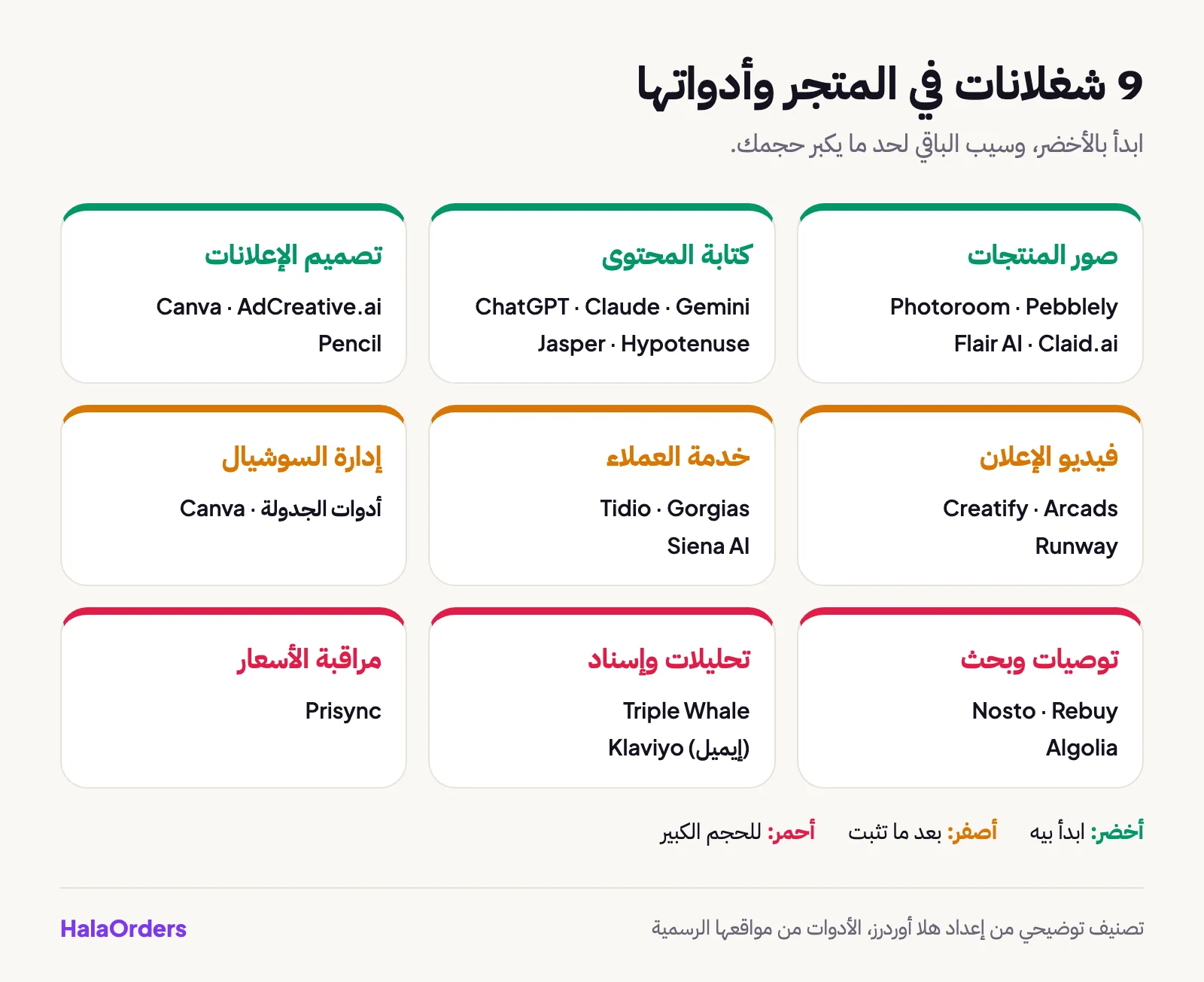
In short: AI tools for e-commerce fall into nine jobs: product photos, ad videos, ad design, copywriting, customer service, recommendations and search, analytics, price monitoring and social media management. If you are starting out, begin with just three things: a writing assistant such as ChatGPT, Claude or Gemini, a product photo tool, and Canva for design. The rest (customer support, recommendations and advanced analytics) won't make a difference before you have a steady volume of orders.
What are AI tools for e-commerce?
AI tools for e-commerce are programs that use language models or image and video models to do a job the merchant used to do by hand or pay someone for: editing a photo, writing a description, replying to a customer or suggesting a product. The idea isn't that they replace you, it is that they finish repetitive work in minutes while you review the result.
There is one thing to keep in mind from the start: these tools were mostly built for stores in the US and Europe, and integrate with platforms such as Shopify. So some are excellent on their own (like the photo and writing tools), and some need a global store to work. We point this out with each tool.
Which AI tools are there for product photos?
The photo is the first thing the customer sees, and it is the cheapest place to start.
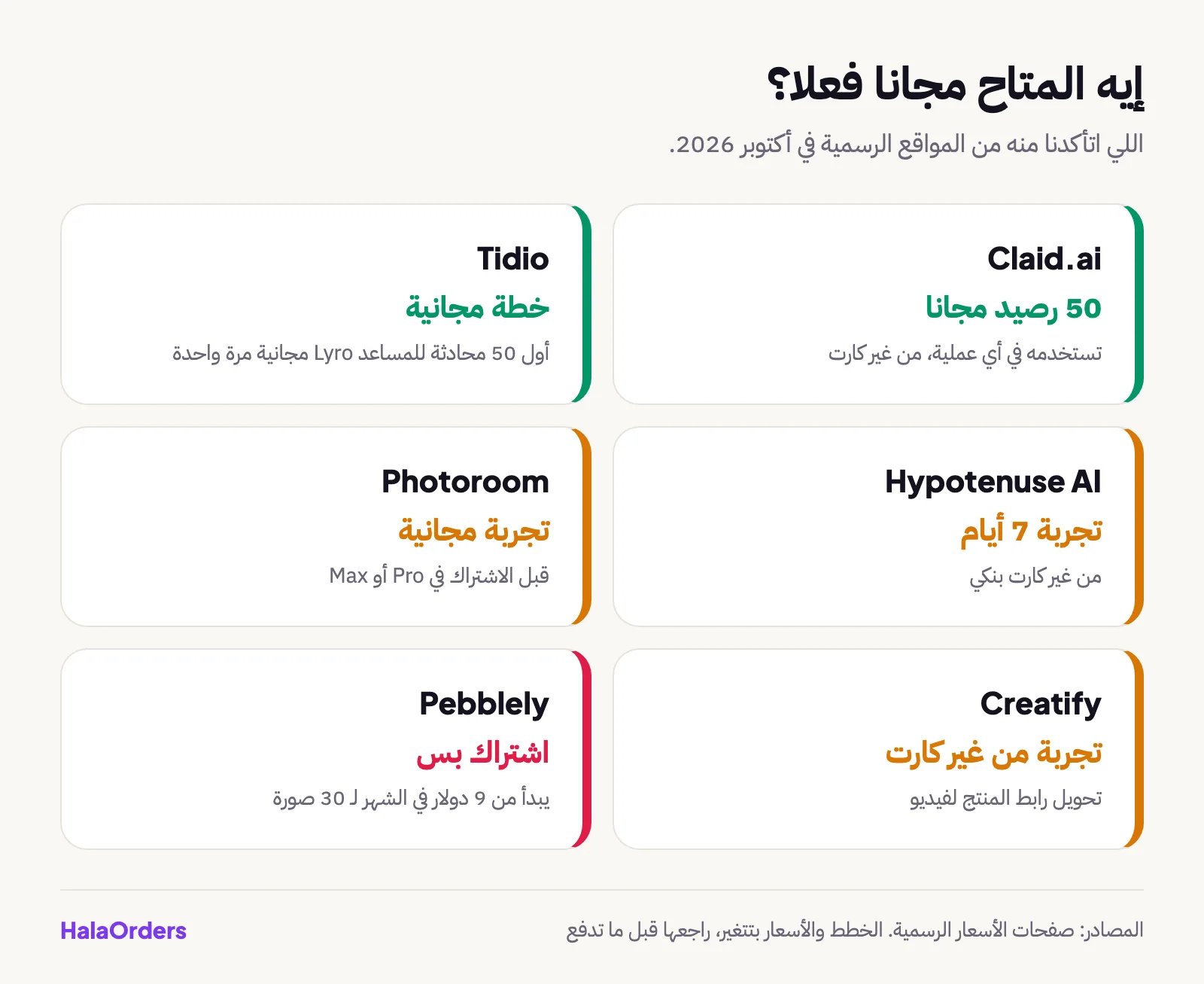
- Photoroom: removes the photo background and adds a white background or a ready-made scene, and exports photos in ready sizes for Instagram and stores. It suits people who shoot on a phone and want a quick result. Its website in October 2026 offers a free trial before subscribing.
- Pebblely: you upload the product photo, describe the scene, and it produces a photo with a different background. According to its website in October 2026, the subscription starts at 9 dollars a month.
- Flair AI: builds photo scenes for your product with more control over the look. Its prices and limits change and are quoted differently across sources, so check its website before you pay, and pay attention to the commercial use terms.
- Claid.ai: improves photo quality, upscales images and runs an AI photo shoot. It has a free plan with 50 credits according to its website, enough to try it.
If product photos are your priority, there is a full article coming on AI product photography.
Which AI tools are there for ad videos?
Ad videos are the most expensive thing to produce the traditional way: a photographer, a model, editing. These tools try to shortcut that.
- Creatify: you enter the product link and it produces a ready ad video, and its website says you can try it without a bank card.
- Arcads: you write a script and get a video of a virtual character speaking in a "real user testimonial" style. According to external reviews, it can't convincingly show the actual product in the character's hand, which is a weakness for products the customer needs to see.
- Runway: a tool for generating and editing video, better suited if you want creative shots rather than a direct sales video.
And keep in mind: Meta and TikTok label AI-generated content in many cases, and Egyptian customers are sensitive to anything that looks "not real". We cover this in a separate article on video.
Which AI tools are there for ad design?
- Canva: has a free plan and AI tools inside the same program (photo editing, writing, effects), which is why it is the first stop for any small merchant. The limits of the AI tools in the free plan change, so check the pricing page.
- AdCreative.ai: generates ad designs in different sizes from your brand identity.
- Pencil: a platform from the Brandtech Group that generates image and video ads and predicts which will perform best. It seems aimed at larger companies, and there is no free plan according to external reviews.
- Meta itself: has tools inside Ads Manager, such as generating backgrounds for product photos and text variations, and they change over time, so check what is available in your account.
Which AI tools are there for copywriting?
This is the most useful area for Egyptian merchants, because writing is daily work: product descriptions, ads, replies, return policies.
- ChatGPT, Claude and Gemini: general assistants that all write Arabic and have free plans with usage limits (limits and prices change, so check their websites). Quality differences in Egyptian Arabic change from version to version, so try the same request on all three. A full article with ready prompts to copy is coming.
- Jasper: a marketing tool that saves your brand's tone and writes content in bulk, aimed at marketing teams.
- Hypotenuse AI: specializes in bulk product descriptions from a CSV file, and its website offers a 7-day free trial.
Which AI tools are there for customer service?
- Tidio: live chat with an AI assistant called Lyro. There is a free plan, and the assistant's first 50 conversations are free once, not every month, according to its pricing page in October 2026.
- Gorgias: a support ticket system aimed at online stores, with most integrations for global platforms.
- Siena AI: an AI agent that replies to customers of DTC stores in the brand's tone, and works on email, chat, WhatsApp and social media according to external coverage.
The honest truth: most of your customers in Egypt talk to you on WhatsApp, Messenger and comments. These tools won't solve that on their own, and there is a dedicated article coming on this.
What about tools for recommendations, search, analytics and pricing?
These are tools for high volume. If you have 20 orders a day, you won't need them.
| Job | Tool | What it does | Who it suits |
|---|---|---|---|
| Email and SMS | Klaviyo | Campaigns and messages based on customer behavior | Stores with a large customer list |
| Product recommendations | Nosto, Rebuy | Suggest complementary products and offers in the cart | Stores with hundreds of products; Rebuy is built for Shopify |
| On-site search | Algolia | Fast, smart catalog search | Large stores with developers |
| Analytics and attribution | Triple Whale | Brings ad and sales numbers together in one dashboard | Mostly Shopify stores |
| Price monitoring | Prisync | Tracks competitors' prices and stock and alerts you | Merchants with similar products where price is decisive |
If your store is still small, instead of Nosto and Rebuy use manual tools such as product bundles and quantity offers. And instead of Triple Whale, use Google Analytics 4 and the Meta Pixel.
Where do I start if my budget is small?
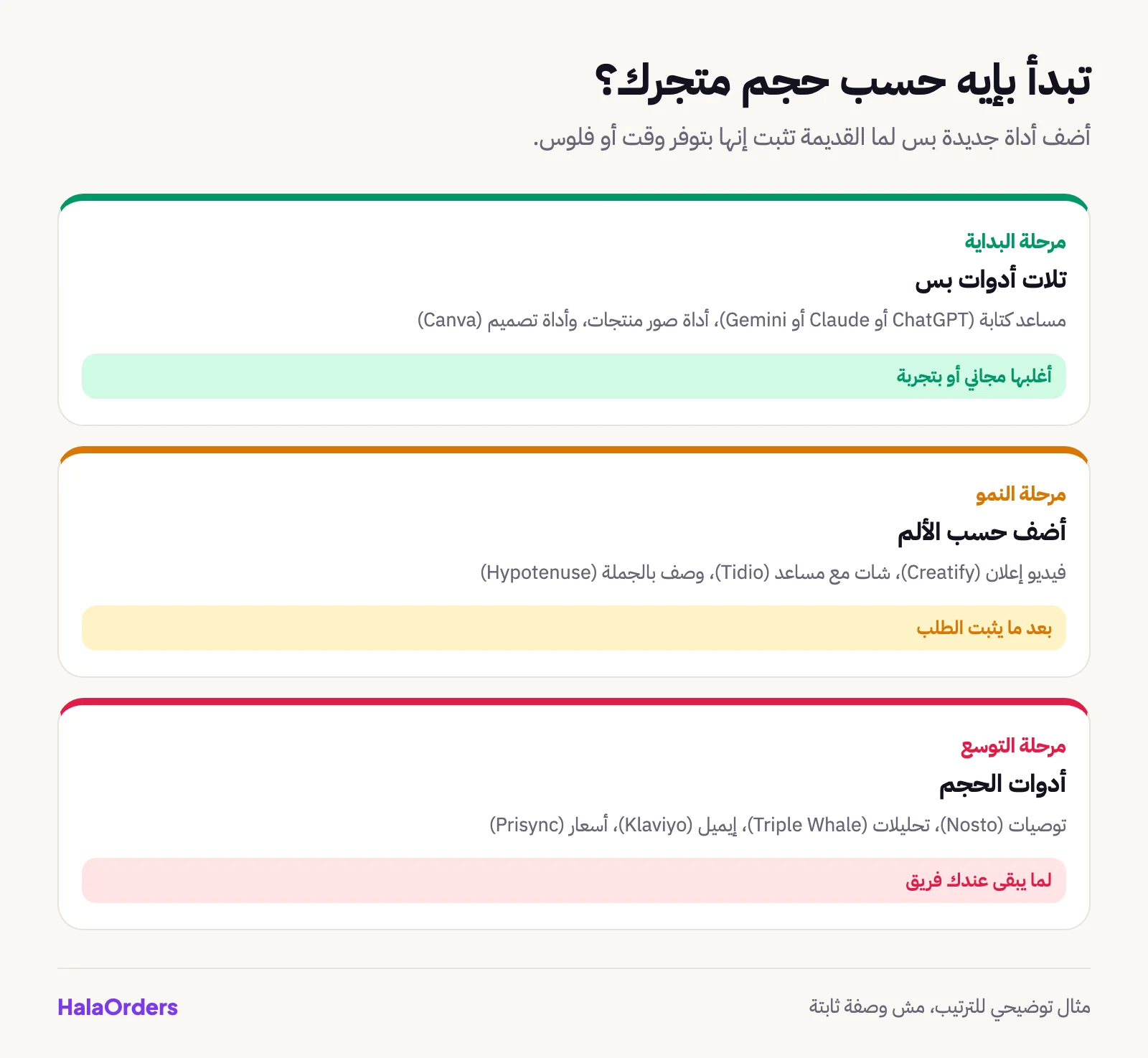
- Start with a free writing assistant (ChatGPT, Claude or Gemini) for descriptions, ads and replies.
- Choose one photo tool and work with it for two weeks on your core products only.
- Use Canva to design ads and posts.
- Measure: after a month, has your time gone down? Has your conversion rate gone up?
- Pay only when you find the tool clearly saves time or money, and set yourself a monthly cap.
What risks do you need to watch out for?
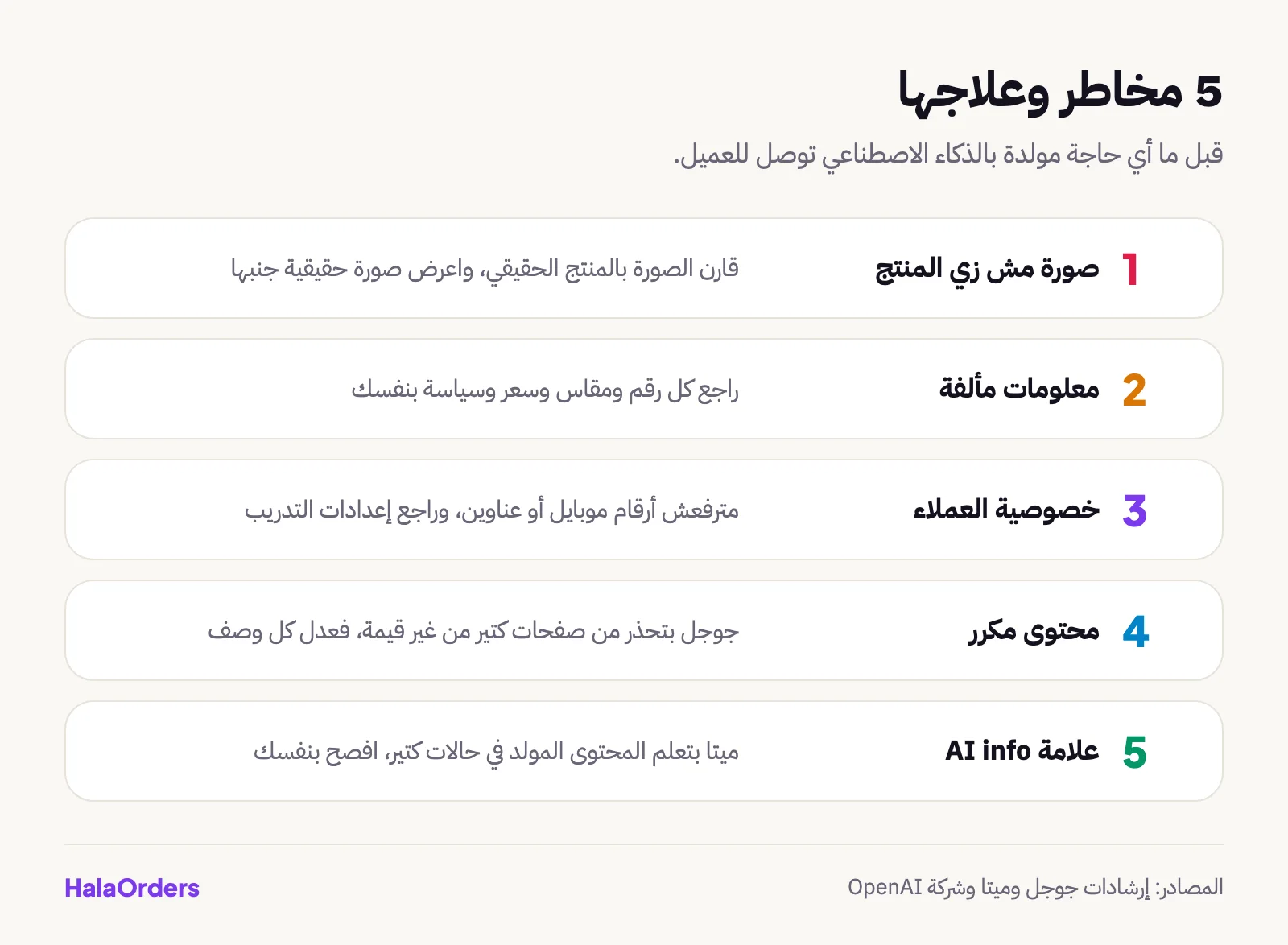
- A photo that doesn't match the product: if the generated photo changed the product's color or shape, it will come back as a return.
- Wrong information: models sometimes make up specifications, prices and policies. Check every number.
- Privacy: don't upload customer data (phone numbers and addresses) into any tool. OpenAI itself offers an "Improve the model for everyone" setting in Data controls that you can turn off.
- Google and content: Google's guidelines say using AI in content isn't banned, but if you generate lots of pages with no value for the reader, it may treat them as duplicate content or spam.
- Meta labels: Meta marks images generated or edited with AI with an "AI info" label in many cases, so if that matters for customer trust, disclose it yourself.
How does HalaOrders work with these tools?
HalaOrders is an Egyptian platform for building online stores and landing pages. It has no built-in AI tools, and that is a clear decision: you prepare your content with whatever tool suits you and put it in the store. What the platform provides is the foundation you build on:
- Product photos you produce with any tool are converted to WebP and resized automatically, so the store stays fast.
- Landing pages with ready templates and a visual editor, where you can try different ad texts with an A/B test that picks the best converting one.
- Meta Pixel, TikTok Pixel and Google Analytics are added with just the ID from the dashboard, which gives the ads you designed with AI data to learn from.
- Telegram notifications for new orders and a daily report.
- The features overview and the plans if you are comparing.
And in the statistics article you will find the market numbers that decide which tool is worth it.
The bottom line
Start with the free ones: a writing assistant, a photo tool and Canva. Try one tool at a time, measure the time you saved, and then decide whether to pay. Leave recommendation tools and advanced analytics until you have the order volume that justifies them. And review anything a tool generates before the customer sees it.
Frequently asked questions
What are the best AI tools for a small online store?
The best start is a free writing assistant (ChatGPT, Claude or Gemini), a product photo tool such as Photoroom, Pebblely or Claid.ai, and Canva for design. The three cover descriptions, photos and ads, and most have a free plan or a trial before you pay, according to their websites.
Do AI tools work with Egyptian stores?
Writing, photo and design tools work with any store because they are separate from the platform. Recommendation, analytics and support tools (such as Rebuy, Triple Whale and Gorgias) are mostly built for global stores, so check the integration before subscribing.
Will AI replace the copywriter and the photographer?
No, it will speed up the work, not remove it. The draft comes out in minutes, but someone has to check the numbers, the tone and what the real product looks like. Google says AI content isn't banned, but it must be useful to the reader.
Do I have to disclose that a photo was made with AI?
Meta adds an "AI info" label in many cases to content generated or edited with AI. And for trust, show a real photo of the product next to any generated one, because a customer who receives something different refuses the delivery.
Should I upload my customers' data to AI tools?
Better not. Don't upload phone numbers or addresses. And in ChatGPT you can turn off the "Improve the model for everyone" setting in Data controls so your conversations aren't used to train the model.
Sources
- Photoroom: Pricing
- Pebblely: Pricing
- Claid.ai: Pricing
- Flair AI
- Canva: Pricing
- Tidio: Pricing
- Hypotenuse AI
- Creatify: URL to Video
- Pencil
- Prisync
- Google Search Central: Using generative AI content
- OpenAI: Data controls in ChatGPT
- Meta: Changing the "Made with AI" label to "AI info"
- Meta for Developers: AI features for ad creative