An ad for a 650 EGP dress worked well for two weeks, and then the cost per order started climbing. You know why: people saw the same image dozens of times, so it became part of the feed that nobody stops at. The natural fix is to launch a new design, but the designer will take two days and money, and you need 5 designs, not one.
This is where AI makes a difference: it produces many versions of the same idea in minutes. But the real problem isn't producing designs, it is knowing which one actually sells. In this article we explain the tools available in 2026, how to do AI ad design without it looking artificial, and how to test the versions in a way that gives you a result you can trust.
In short: AI ad design means using tools like Canva, AdCreative.ai and Meta's own tools to produce multiple versions of the ad image and copy quickly. The tools only speed up production; the profit comes from testing: change one element at a time (the hook, the image or the offer), give each version enough budget, and then continue with the one with the lowest cost per order.
What is AI ad design?
AI ad design is using programs that generate or edit ad images and copy from your product photo or a written description, instead of starting each design from scratch. It can work in three places:
- The image itself: a new background for the product, or expanding the image to different sizes (square, vertical for stories).
- The copy: ad headlines and descriptions in different wordings.
- Assembling the ad: tools that put the image, text and button into ready templates in large numbers.
AI here is a production assistant. The decision about what to say to the customer is still yours, and that is exactly what we test afterwards.
Which ad design tools are useful in 2026?
Prices and free plans change a lot, so the list below describes each tool's function, and you need to check the current plan on the official website before you pay.
| Tool | What it does | Who it suits | Notes |
|---|---|---|---|
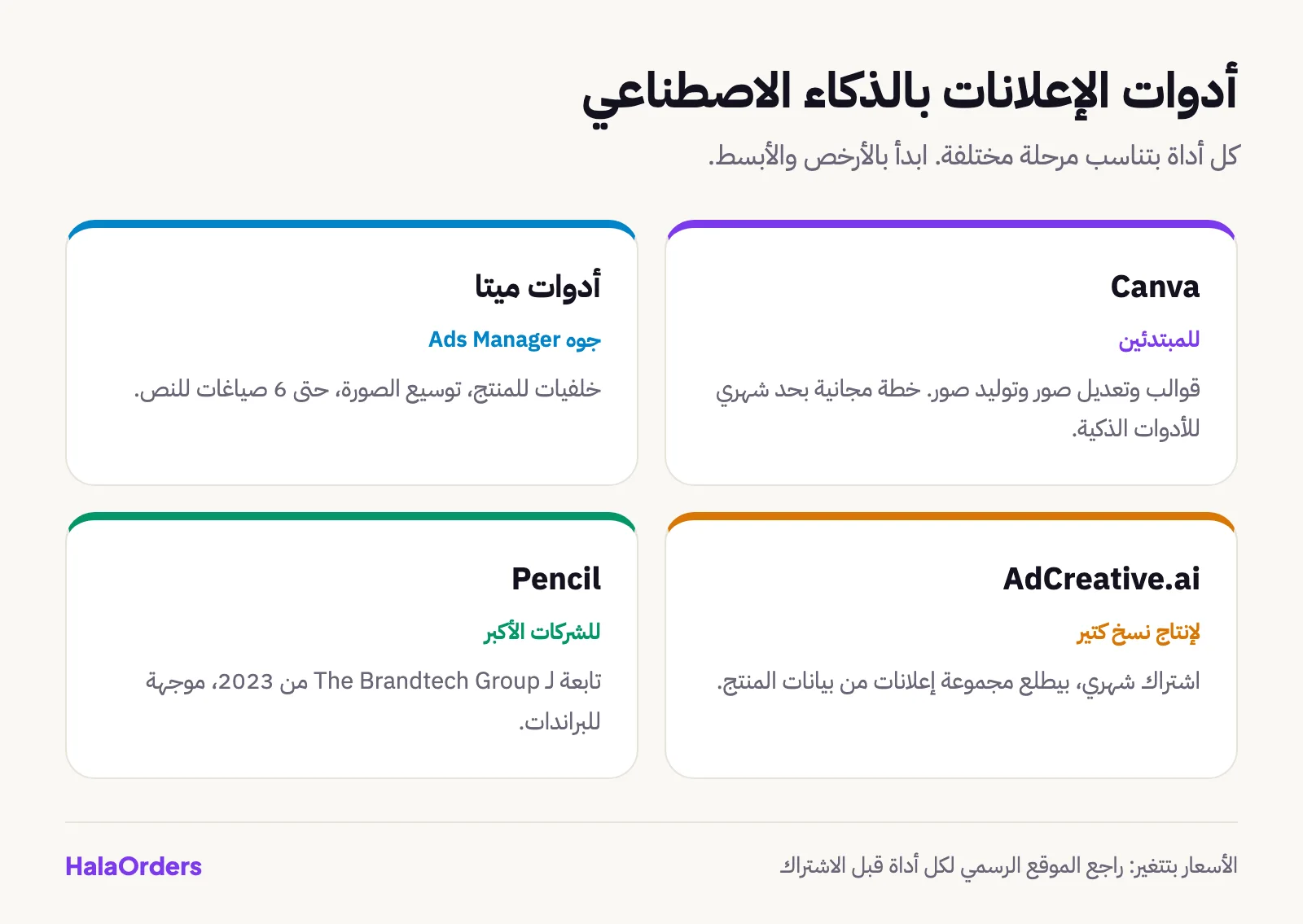
| Canva (Magic Studio) | Designing and editing images and ad templates, and generating images | Any small merchant, the first tool to start with | According to the Canva Help Center, free users get limited monthly use of the paid AI tools |
| AdCreative.ai | Generates sets of ads (images + copy) from brand and product data | A merchant who advertises a lot and needs versions fast | A monthly subscription with a trial period according to what is published about it; check the current plan. Test how the Arabic font looks yourself |
| Pencil | Generates video and image ads and predicts their performance | Larger companies and brands | Acquired by The Brandtech Group in 2023, and aimed more at companies |
| Meta's own tools (Ads Manager) | Background generation, image expansion and multiple copy variations | Anyone advertising on Facebook and Instagram | Inside Ads Manager with no extra subscription; what is available varies by account |
| ChatGPT or Claude | Ideas for hooks, headlines and wordings | Every merchant | For copy only, not design. See this article |
Meta's built-in tools
According to what Meta has published and Jon Loomer has covered, the generative AI tools in ads include generating backgrounds for the product, expanding the image to fit different sizes, and up to 6 variations of the primary text. So if you already advertise on Meta, try these first because they have no subscription cost and work inside the same account. The Facebook and Instagram ads guide covers setting up the campaign itself.
Where do I start if my budget is small?
Start with Canva because you probably have it open already, then Meta's tools. AdCreative.ai makes sense once you spend on ads steadily and feel that producing versions is the bottleneck. Pencil doesn't suit a store that is just starting.
Why is the ad itself (the creative) the most important thing?
A 2017 Nielsen study of about 500 consumer goods campaigns found that the quality of the ad and its message accounted for 47% of the ad's effect on sales, and the context (where it was shown) only 2%. The study covered consumer goods in the US, not Egyptian stores, so treat it as an indication of direction, not a literal number. The idea holds up in practice: you control the image and the words far more than who sees the ad.
How do I make an ad with AI step by step?
- Photograph the original product as well as you can. The tools improve the background, not the quality of a badly shot product. If you need to, look at how to shoot with a phone.
- Write 3 message ideas before opening any tool. For example: price ("an evening dress for 650 EGP"), comfort ("cotton that doesn't wrinkle"), trust ("exchange within 14 days").
- Ask ChatGPT for 5 hooks for each idea, and choose the ones that sound like natural Egyptian Arabic. Remove any stiff formal word.
- Make the design in Canva or another tool, with the same colors and font in every version so the brand stays clear.
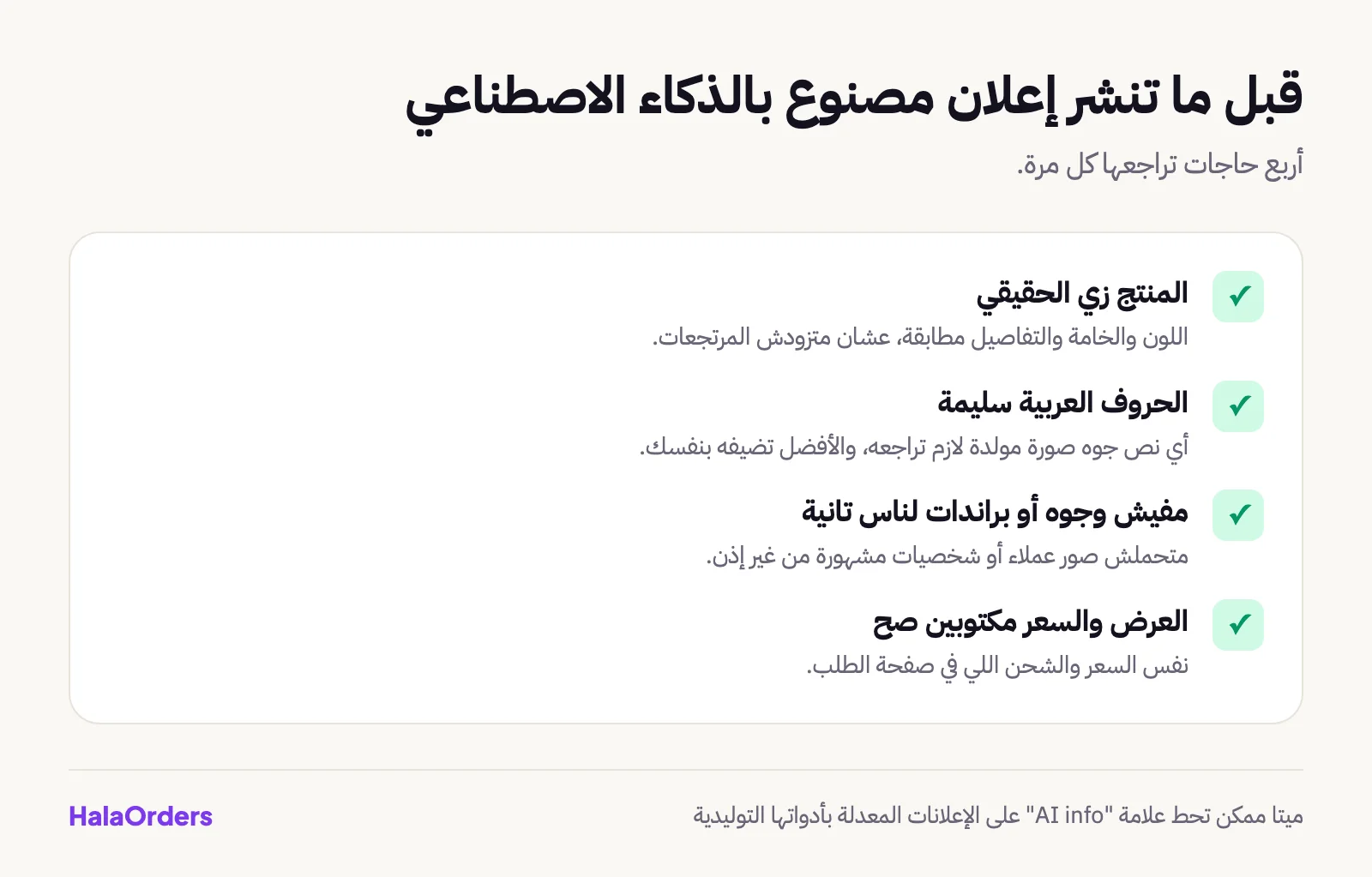
- Check every image with your own eyes. Make sure the product's color and details match reality, and that the Arabic text is correct. Image generation tools sometimes break Arabic letters, so it is better to add the text yourself on top of the image.
- Launch the versions in a test campaign in the way described next.
How do I test ads correctly?
This is the part that separates a merchant spending money on pretty designs from a merchant who comes out with orders.
Rule 1: change one element at a time
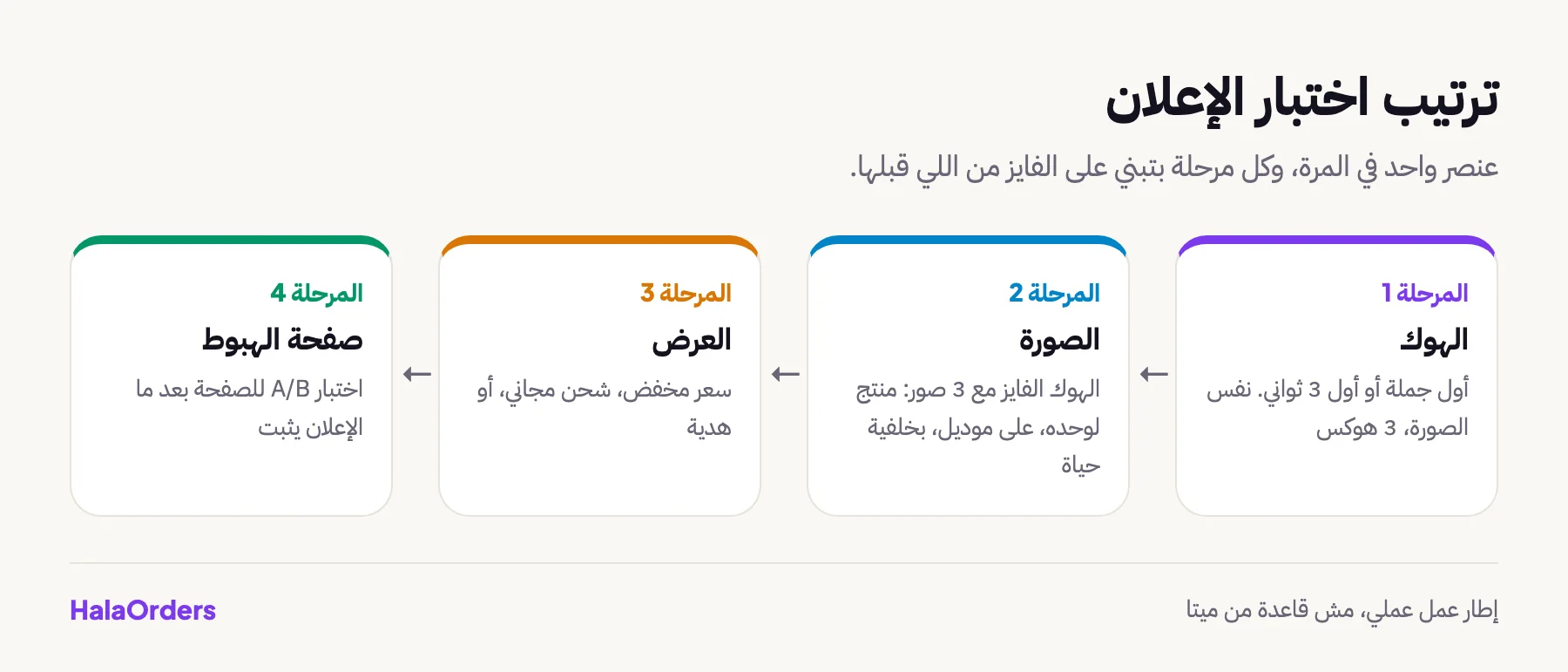
If you change the image, the copy and the offer together, you won't know what worked. Order the test like this:
- The hook (the first sentence or the first 3 seconds): this usually has the biggest effect, so start with it.
- The image or video: the same hook on 3 different images (the product alone, on a model, in a lifestyle setting).
- The offer: a discounted price, free shipping or a gift, with the same winning image.
- The landing page: once you know the winning ad, test the page itself.
Rule 2: give each version enough budget to judge it
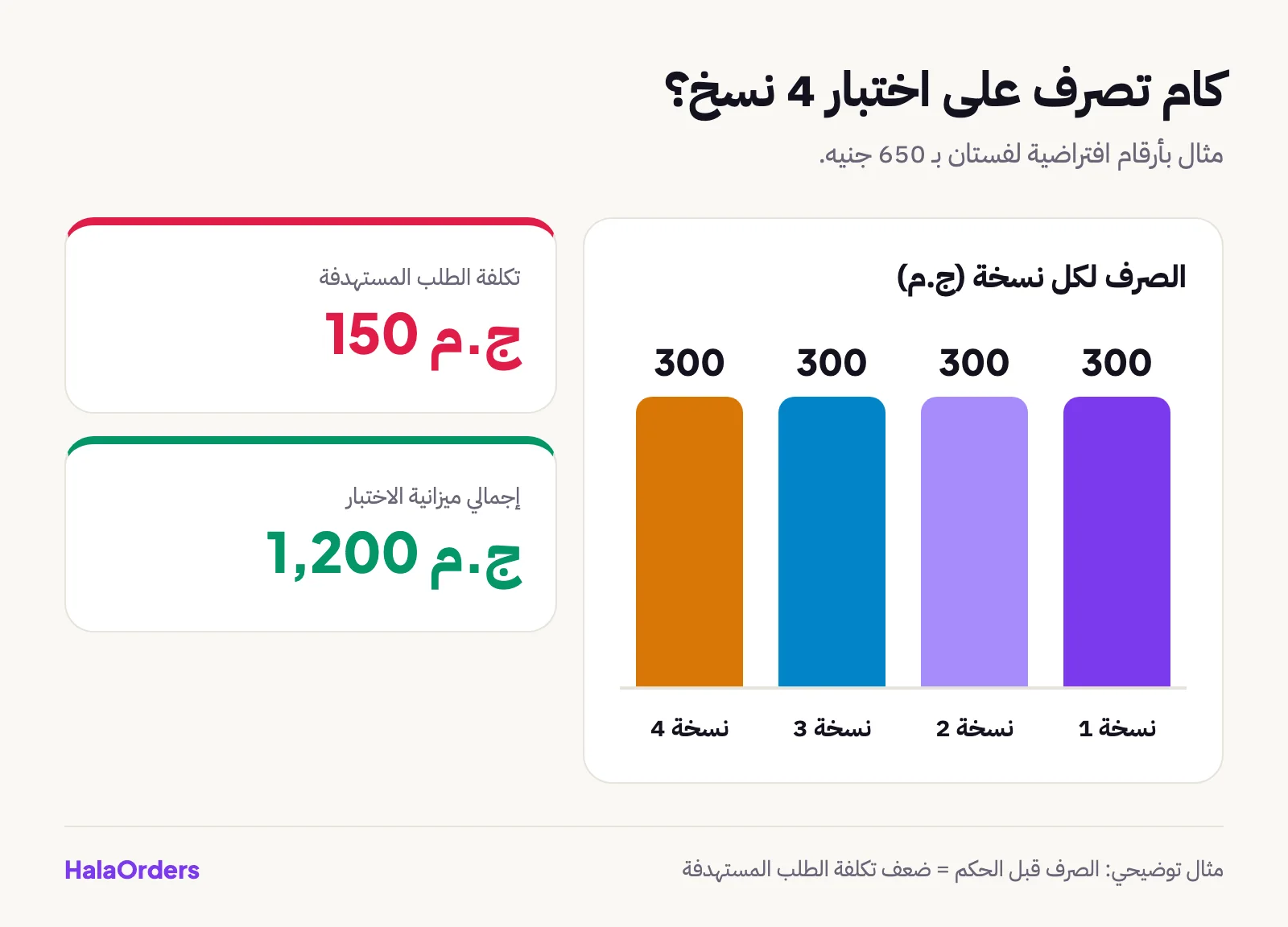
Judging after 20 clicks is unfair to the version. A practical rule many advertisers use: let each version spend at least twice the cost per order you are willing to pay before you pause it. And use fewer versions instead of spreading a small budget across 10.
Example (hypothetical numbers): your profit margin on the dress allows a cost per order of 150 EGP. So each version needs about 300 EGP of spend before you decide. 4 versions means 1,200 EGP of testing, not 12,000.
Rule 3: judge by delivered orders, not clicks
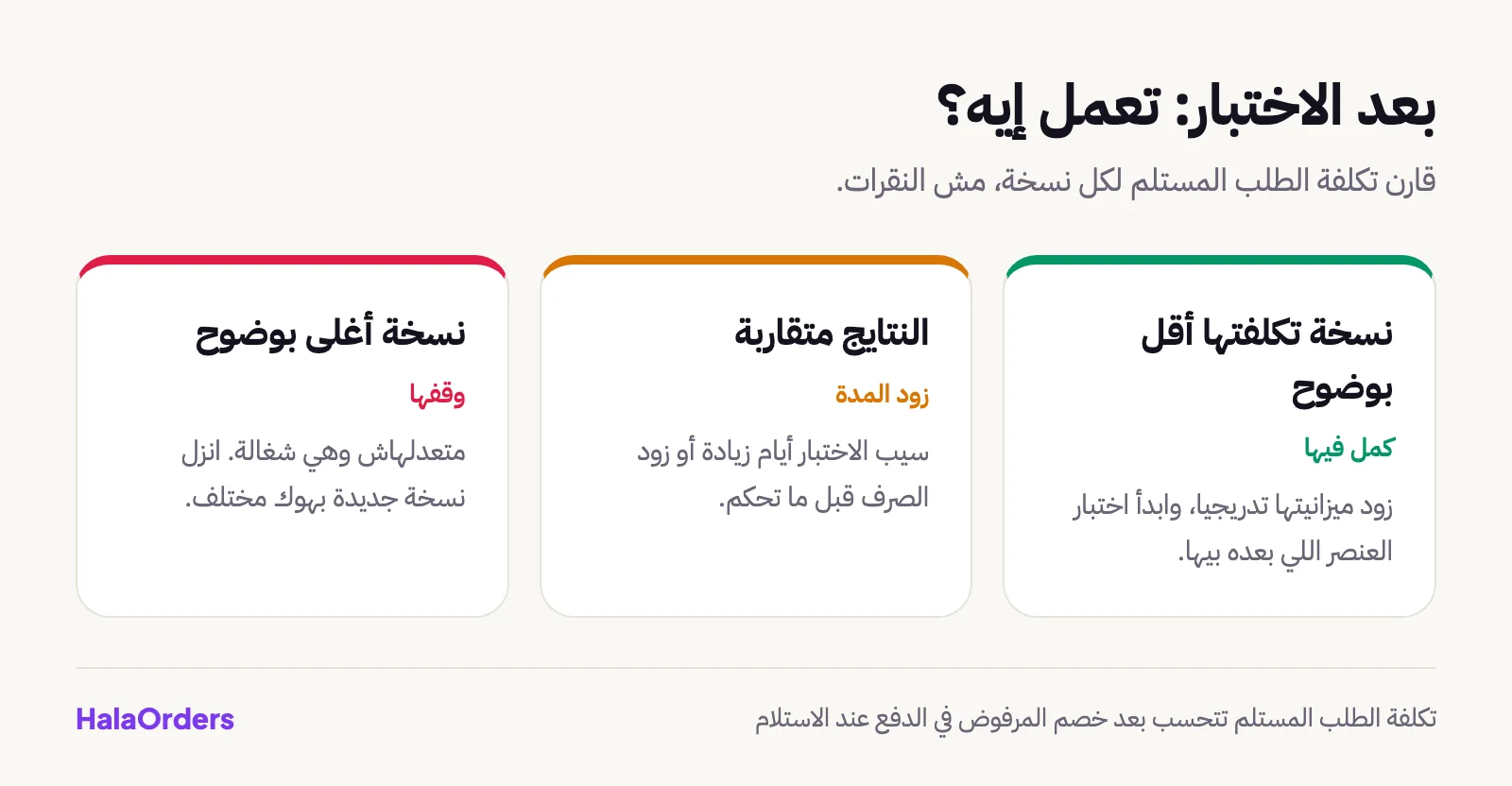
A version with cheap clicks can bring curious people who won't buy. Compare the cost per order, and with cash on delivery compare it again after removing refused orders. The profit calculator will help: profit calculator. And if you see a high refusal rate, see ways to reduce fake orders.
Rule 4: don't edit the ad while it is running
Every edit makes Meta re-learn, so pause the weak version and launch a replacement instead of editing it. And leave the test for at least 7 days when the budget allows, so it covers every day of the week and payday.
What are the risks of AI-made ads?
- The product must look like the real thing. A photo of a dress in a different color, or with a nicer fabric than reality, means returns and a bad reputation. The tools change the background, not the product.
- Meta's "AI info" label. According to Marketing Dive and Social Media Today, Meta labels ads created or heavily edited with its generative tools, and tries to detect those made with other tools through file metadata. The label sits under "About this ad". It isn't a problem in itself, but remember the customer may know.
- Arabic letters. Check any text that appears inside a generated image.
- Privacy and rights. Don't upload customers' photos or real people's faces without their permission, and don't use celebrities or brands in the design.
- Sameness. If everyone uses the same templates, your ad will look like your competitor's. Change the colors and the message to fit your product.
How does HalaOrders help with testing?
HalaOrders is an Egyptian platform for building online stores and landing pages. What matters for our topic:
- Landing pages with ready templates, a visual editor and the order form inside the page, so the ad takes people to a page designed to convert the order.
- A/B testing of up to 4 versions of the page, with the system picking the winner automatically once it reaches 95% confidence.
- Connecting the Meta Pixel, TikTok Pixel and Google Analytics with the ID from the dashboard, so you know the actual orders from each ad.
- Cash on delivery with an optional deposit if refusals are hurting your numbers.
HalaOrders has no AI design generation tools, so you design the ad itself in the tools above. See the plans if you are still choosing.
The bottom line
Use AI to produce 4 to 5 versions in an hour instead of 5 days, but the money is in the testing. Change one element, give each version enough spend, judge by the cost per delivered order, and make sure the ad looks like the real product. Start with Canva and Meta's tools if your budget is small.
Frequently asked questions
What is the best tool for designing ads with AI?
There is no single best tool. Canva suits beginners, AdCreative.ai produces many versions quickly if you advertise constantly, and Meta's tools inside Ads Manager are available without a subscription. More important than the tool is testing the versions and judging by the cost per order.
How many ad versions should I test at once?
3 to 4 versions are enough for a small store. More spreads the budget over many versions so none gets enough spend. Each version needs to spend roughly twice the target cost per order, so if the target is 150 EGP, spend about 300 EGP before judging.
Does Meta label AI-made ads?
Yes. According to Marketing Dive and Social Media Today, Meta adds an "AI info" label to ads created or heavily edited with its generative tools, and tries to detect those made with other tools too. The label appears under the "About this ad" option.
How do I know which ad worked?
Compare the cost per delivered order for each version after it has had enough spend, not the number of clicks. With cash on delivery, also count refused orders, because a version with cheap clicks can bring people who won't accept the delivery.
Should I use AI-generated product photos in the ad?
You can change the background, but the product itself must appear in its real color and material. Any difference between the photo and reality increases returns and hurts customer trust, so review every image before publishing.
Sources
- Nielsen via MarketingCharts: Creative quality and ad effectiveness
- Jon Loomer: Generative AI Features for Ads (Meta)
- Marketing Dive: Meta updated disclosure tags for AI-generated ads
- Social Media Today: Meta adds updated disclosure tags for AI-generated ads
- Canva Help Center: access to AI tools
- AdCreative.ai: official website
- Pencil: official website