A 650 EGP dress photographed at night under a yellow bulb, on the bed, against a wrinkled bedspread. The customer looks at the photo for a second and a half while scrolling, and moves on. Not because the dress is bad, but because the photo told her "I don't trust this work".
The good news is that product photos that sell don't need a 40 thousand EGP camera or a studio. A mid-range phone, a window and a sheet of cardboard make phone product photography that makes a real difference to orders. In this article we go step by step: light, background, angles for each type of product, editing, and the image sizes your store, ads and Google Shopping need in 2026.
In short: to photograph your products professionally with a phone, shoot in front of a window in indirect daylight, use a white or plain background, fix the phone on a stand, and take at least 5 angles of each product. Edit the photo with a free app (lighting and cropping only, no filters) and upload it at no less than 1500 pixels on the longest side, which is better than Google's minimum.
How do I photograph my products with a phone? The basic setup
Phone product photography depends on three things before any camera: good light, a clean background and a steady phone. Get those right, and even a 3-year-old phone camera will produce a decent photo.
The tools you will need (at the lowest cost)
- A phone with a rear camera: not the front one. Clean the lens with a soft cloth before every session; a dirty lens causes most dull photos.
- A fixed stand (tripod): you can find one cheaply at any stationery shop or online. It prevents shaking and keeps every photo at the same angle and height.
- White paper or a large white board: to make a curved background (with no corner) under and behind the product.
- A white card or foam board: a reflector that bounces light back onto the dark side of the product.
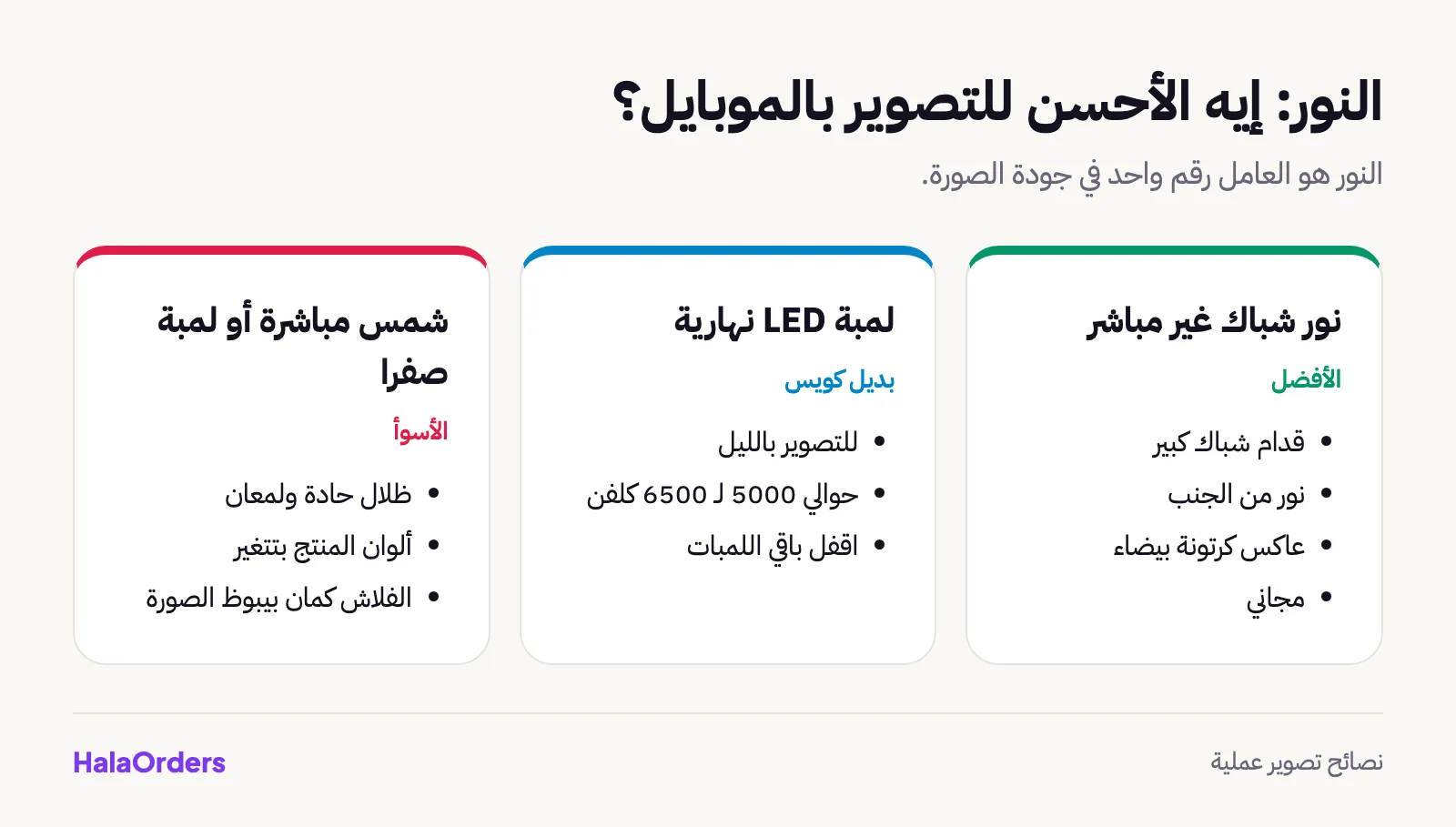
- Optional: a daylight LED bulb (about 5000 to 6500 kelvin) if you shoot at night.
Light: the secret that separates an amateur photo from a professional one
Light is the number one factor. The best free light is indirect window light, meaning the sun isn't shining directly on the product. Direct sun creates harsh shadows and too much shine, and a yellow ceiling bulb changes the color of the whole product.
Lighting steps
- Put the table next to a large window, so the light comes from the side of the product, not from behind it.
- Turn off all the room's lights. If you leave a yellow bulb on, it will mix the colors.
- If the sun is direct, cover the window with a thin white fabric or a large sheet of baking paper to soften the light.
- Place the reflector (white card) on the other side to open up the shadow.
- Always turn off the flash. Flash creates glare and harsh shadows.
- Lock the exposure: tap the product on the camera screen and drag the sun icon until the white looks white, not gray.
The background: what suits your store?
A white background is the safest choice for the product page and Google Shopping. Google itself, in its Merchant Center requirements, asks for the product to be clear and free of distracting elements. Photos for Instagram and ads, on the other hand, may need a background that tells a story.
| Background type | Suits | Advantages | Drawbacks |
|---|---|---|---|
| Curved white paper | The product page, Google Shopping | Clean and quick, the product looks honest | Can feel cold if every photo is like this |
| Plain colored fabric or paper | Instagram, ads | Gives your brand an identity | Must stay the same shade in every photo |
| A wood or marble surface (contact paper) | Accessories, care products, food | A refined, warm feel | Needs cleaning and shows scratches |
| A real place (a corner at home) | Lifestyle photos and ads | The customer imagines the product in their home | The background can steal attention |
Our advice: make a white main photo for every product, and one or two lifestyle photos. The first is for the page and the feed, and the second for ads and social media.
Angles: how many photos and from which direction?
The customer can't touch the product, so the photos are their hands and eyes. You need at least 5 to 7 photos for each product, and they vary by type.
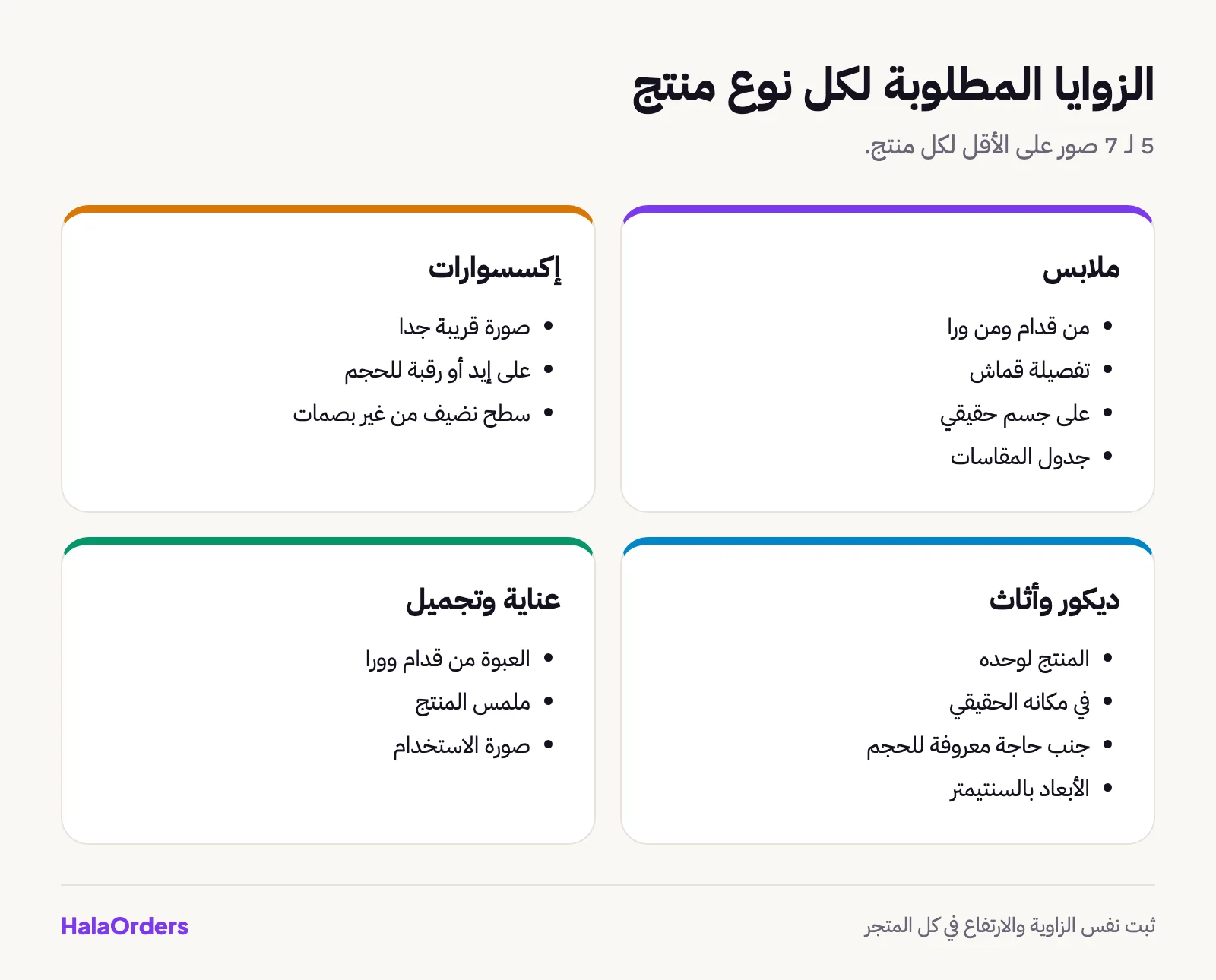
Clothing
- From the front and back on a hanger or mannequin, or laid flat on a surface from above.
- A close-up of the fabric detail (the stitching, the trim, the material).
- A photo on a real body, which answers "what will it look like on me?".
- A size photo next to the size chart.
Accessories and jewelry
- A very close (macro) photo of one detail.
- A photo on a hand or neck so the customer feels the size.
- Keep the surface clean, because the shine shows every fingerprint.
Decor and furniture
- The product alone on a plain background.
- The product in its place (a sofa in a living room, a vase on a table).
- A familiar object next to it so the size shows (a cup, a book), with the dimensions in centimeters in the description.
Care, beauty and food
- The packaging from the front and back (ingredients and date).
- A texture detail (cream on a hand, a powder).
- A photo of it in use.
The general rule for every type: keep the same angle and height for every product in the store, because consistency makes the whole store look like one brand.
Sizes and specifications: a photo accepted in your store and on Google
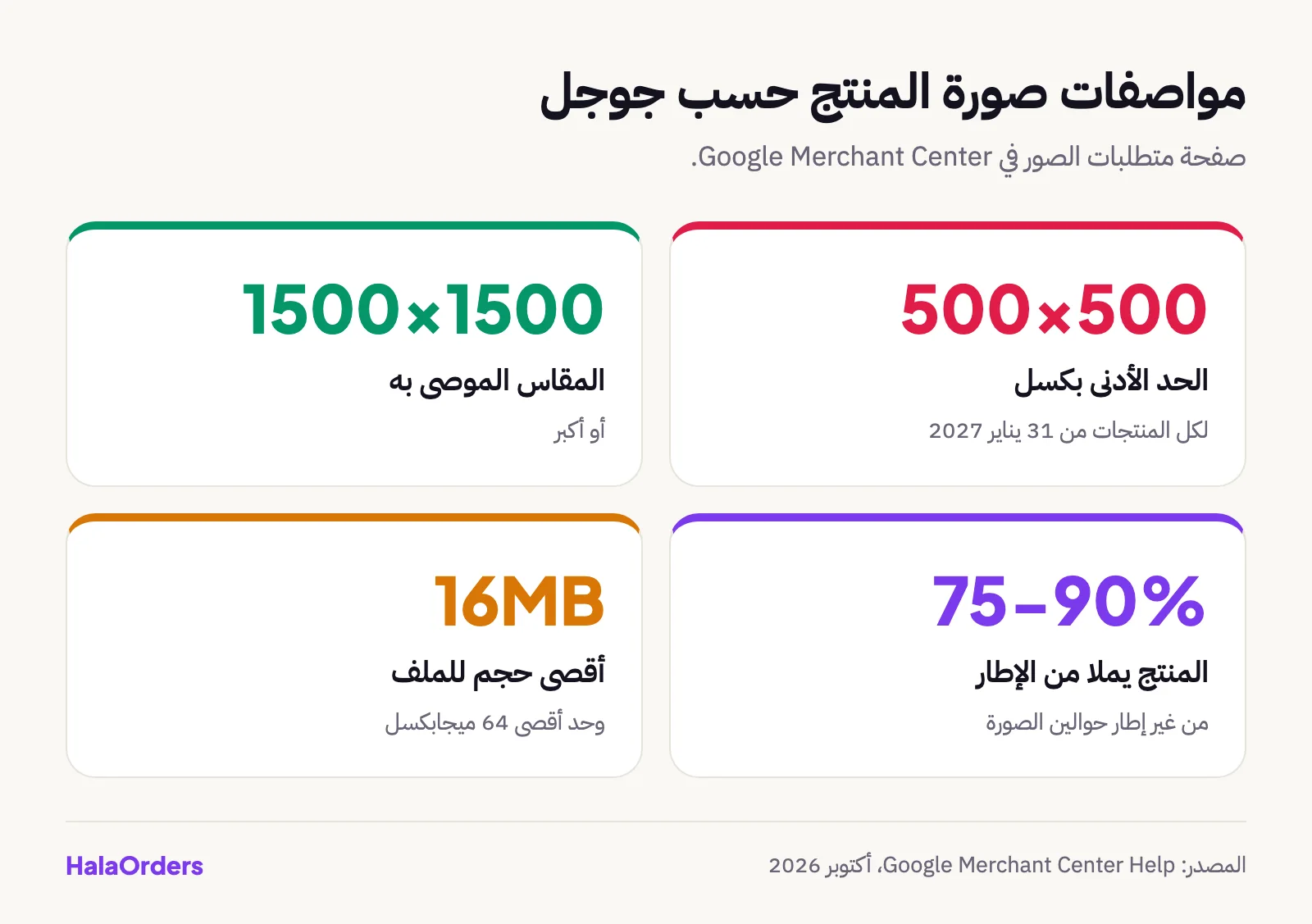
A good photo rejected by Google loses you free visits. According to the image requirements page in Google Merchant Center (which we checked in October 2026):
- The minimum image size is 500 × 500 pixels for all products starting January 31, 2027. Google recommends about 1500 × 1500 pixels or larger.
- The product should fill roughly 75% to 90% of the image frame.
- The maximum file size is 16 megabytes (and 64 megapixels).
- No watermarks, logos added after shooting, promotional text or prices on the image, and no border around the image.
- Allowed formats include JPEG, WebP and PNG.
For Facebook and Instagram ads, the easiest approach is to prepare two versions of the same photo: square 1:1 or 4:5 for the feed, and vertical 9:16 for stories and Reels. Leave space around the product so it isn't cut off when the platform crops the image.
How do I edit a photo without ruining it?
Editing should make the photo match the real product, not make it look better than it is. If the customer receives a different color from the one she saw, there will be a return and a refusal at delivery, and that costs more than any bad photo.
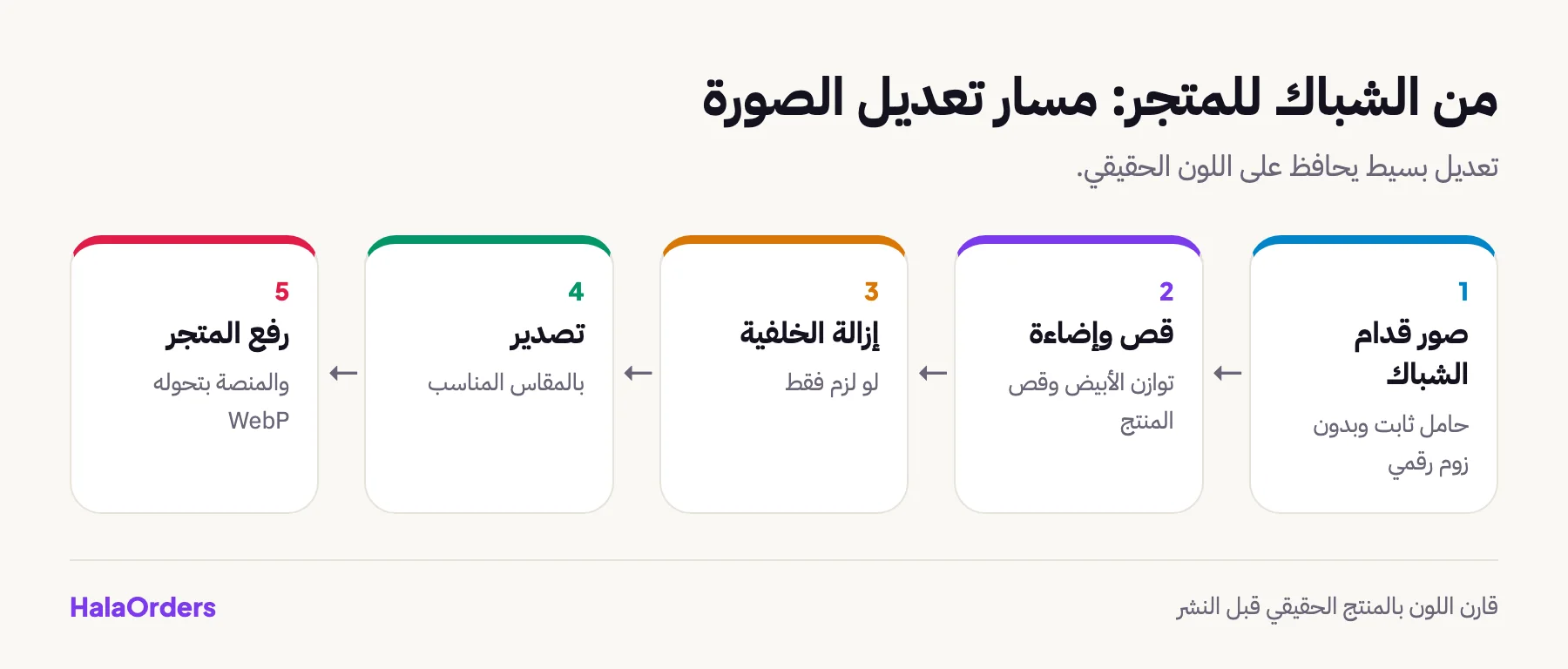
- Shoot at the highest quality and without digital zoom (move closer with your body, not your fingers).
- Crop so the product fills 75 to 90% of the frame.
- Adjust the lighting and contrast slightly, and set the "white balance" until the white looks white.
- Compare the color with the real product on the phone screen itself.
- Export at the required size.
Editing apps
- Snapseed from Google: a photo editing app for Android and iPhone, known to be free (check its store page for the current terms).
- Photoroom: an app for removing and replacing backgrounds. According to the Photoroom Help Center, the app is free to download with a free plan of limited features, and the paid plans unlock the rest.
If you are thinking of using AI to generate backgrounds or lifestyle photos, first read AI product photography and learn when it misleads the customer. And Google asks that AI-generated images keep the metadata that shows this.
Common product photography mistakes
- Strong filters that change the product's color.
- A cluttered background (a bed, other clothes) that distracts.
- Photos cropped at the edge of the product.
- Photos of different sizes in the same store.
- A dirty lens (fingerprints).
- Only one photo of the product.
- Photos taken from the internet, from other stores: you may face copyright problems, and nobody will trust you.
HalaOrders and product photos
HalaOrders is an Egyptian platform for building online stores and landing pages. What it does for your photos:
- It resizes the photos and converts them to WebP automatically, with thumbnails for lists, so your store opens faster on mobile and you don't need to compress them yourself. Page speed affects conversion; read store speed and Core Web Vitals.
- Products with their variants (sizes and colors), so you can link different photos to each color.
- Google Merchant Center: HalaOrders produces a product feed for appearing in Google Shopping, so your photos must meet Google's requirements above.
- Landing pages for ads with an order form on the page, where your best photos will be the first thing the customer sees.
And if you are still preparing your store, see the best products to sell online in Egypt before you shoot, and read conversion rate to see how photos affect orders.
The bottom line
A phone camera is enough if the light, background and stability are right. Shoot by a window, on a clean background, on a steady stand, at least 5 angles, with light editing that keeps the real color. Make a white photo for Google and one or two lifestyle photos for ads, and keep the size at 1500 pixels on the longest side. One hour of shooting is counted once and serves you for months.
Frequently asked questions
How do I photograph my products professionally with a phone?
Shoot in front of a window in indirect daylight, on a white or plain background, with the phone fixed on a stand. Turn off the flash and the room's lights, take at least 5 angles of each product, and edit lightly without strong filters so the product's color stays true.
What is the best size for product photos?
Google recommends photos of about 1500 × 1500 pixels or larger, with a minimum of 500 × 500 pixels for all products from January 31, 2027 according to Google Merchant Center. The product should fill 75 to 90% of the frame, and the file should be under 16 MB.
Do I need studio lighting to photograph products?
No. Indirect window light with a white cardboard reflector is enough to start. If you shoot at night, a daylight LED bulb (5000 to 6500 kelvin) solves the problem. What matters is turning off the room's yellow bulbs, because they change the product's color.
How many photos should I add for each product?
At least 5 to 7 photos: the main photo on a white background, extra angles, a close-up detail, a photo showing size or on the body, and a photo of it in use. For clothing, the front, the back and a size chart matter.
When should I use a white background?
Use it for the main photo on the product page and in Google Shopping, because Google asks for a clear product with no distracting elements, watermarks or promotional text. Colored backgrounds or real scenes suit Instagram and ads better.