You spent 5,000 EGP on a Facebook ad, and the Ads Manager report told you "you got 40 purchases". You were happy, then you opened your orders sheet and found that only 25 were actually delivered. The rest were cancelled at confirmation or refused at the door.
That is exactly the difference between "running ads" and "managing ads". In this article we go step by step through Facebook and Instagram ads for your store in 2026: how to build the campaign, when to use Advantage+, what budget to start with, how to test creative, and how to read the numbers in a way that suits cash on delivery.
In short: Facebook and Instagram ads are managed from one account in Meta Ads Manager, and the best fit for a small store in 2026 is a campaign with the "Sales" objective and a broad audience, with the pixel and Conversions API working together, and a budget that covers about 50 orders a week per ad set so the algorithm can learn. And measure the campaign's success by the cost per delivered order, not the order shown in the report.
Why are Facebook and Instagram still the most important channel for an Egyptian store?
Because people are actually there. According to DataReportal (Digital 2026: Egypt), Facebook's ad reach in Egypt is about 51.6 million, and Instagram's is about 21.7 million in late 2025. TikTok's ad reach among adults is 48.8 million. The same report warns that these are ad reach estimates, not active user counts, so treat them as a rough size, not a precise number.
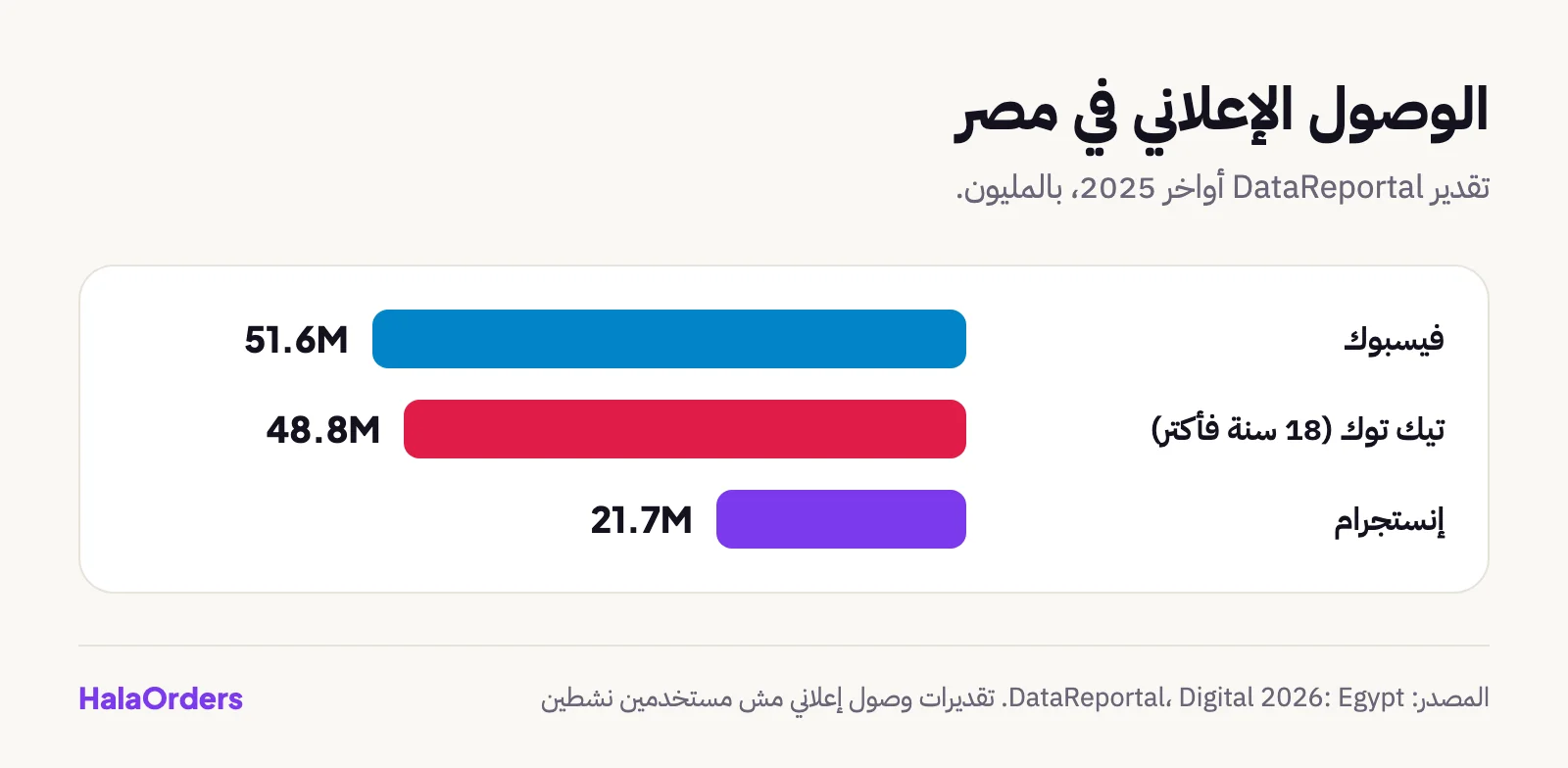
The practical meaning: your audience is available, and competing for attention is the problem. That is why a well-built campaign makes more of a difference than a big budget.
How do you build a Facebook and Instagram ad campaign for your store?
Every campaign in Ads Manager has 3 levels:
- The campaign: sets the objective. For a store, choose Sales.
- The ad set: holds the budget, the audience, the placements where the ad appears and the optimization event (Purchase, for example).
- The ad: the image or video, the text, the button and the link.
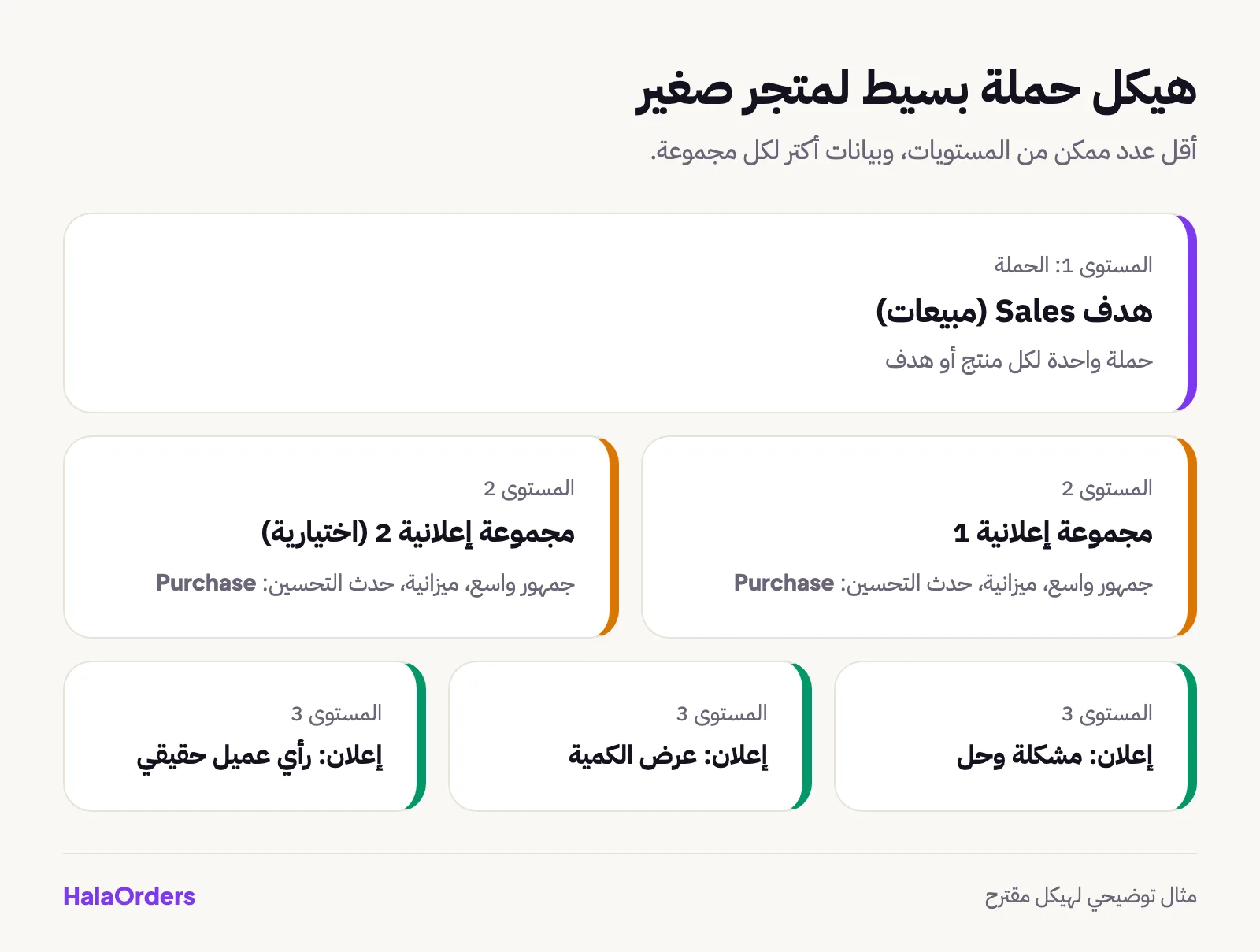
The rule that saves you money: use fewer ad sets. Each ad set needs enough data to learn, and if you split 1,000 EGP a day across 8 ad sets, none of them gets there. Two or three that you keep running are best until your budget grows.
What is the learning phase?
The learning phase is the period in which Meta tries the ad on different people to find who is most likely to buy. According to Meta, an ad set needs about 50 optimization events within 7 days to exit learning and stabilize. If the settings won't produce that number, you see the status "Learning Limited", which isn't a penalty, but a sign that the cost will be higher and unstable. And any major edit (changing the audience, the creative or the optimization event) can reset the counter.
What is Advantage+ and when should you use it?
Advantage+ is a set of automation tools from Meta that let the algorithm choose the audience, the placements and the budget split instead of you setting them by hand. Advantage+ Sales campaigns (formerly called Advantage+ Shopping) are designed specifically for online stores.
| Manual campaign | Advantage+ Sales | |
|---|---|---|
| Audience | You define it (interests, ages) | The algorithm searches on its own |
| Creative | Fixed ads you test manually | You give it many ads and it chooses |
| Control | High | Lower |
| Who it suits | Those with data who want to test a specific angle | Those with a working pixel and enough orders |
| The risk | A budget spread across too many things | Hard to understand why it succeeded or failed |
In Advantage+ Sales there is an optional setting called the existing customer budget cap: if you define your existing customers in Ads Manager, you can stop the campaign from spending most of the budget on people who already bought from you. Meta itself says setting this cap can raise the cost per conversion.
Practical advice for a store just starting: begin with one Advantage+ Sales campaign with a reasonable budget, and add a small manual campaign if you want to test a specific selling angle (for example the same product once as a gift and once for personal use).
Budget: what should you start with?
Instead of saying "I'll start with 200 EGP a day", work backwards:
- Know your margin before ads. Example: a dress at 650 EGP, costing 250, with packaging and the shipping you cover at 60. That leaves 340 EGP before ads.
- Set the target cost per order. If you will accept paying 150 EGP of ads per order (well below 340, to leave room for returns), that is your number.
- Multiply by 50. 150 × 50 = 7,500 EGP a week, which means about 1,070 EGP a day per ad set to exit the learning phase quickly.
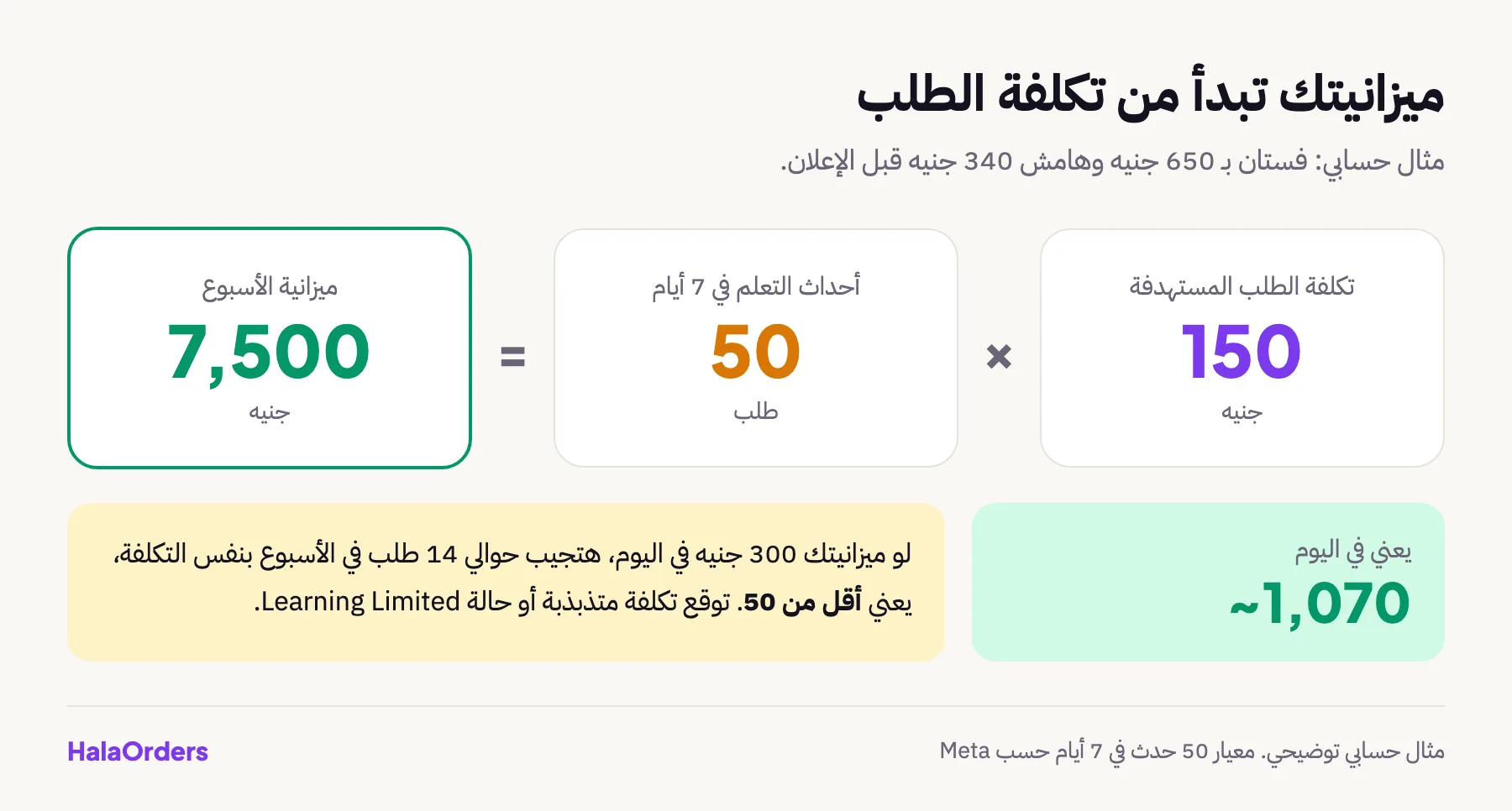
If your budget is lower than that (which is normal at the start), you have two options: optimize for an earlier event such as "Add to cart" instead of purchase, to collect data faster, or accept that the cost will fluctuate at first and avoid editing every day. These numbers are worked examples; put your own product's numbers into the profit calculator before you spend.
The pixel and Conversions API: why both?
The Meta Pixel is a small piece of code placed in the store that tells Meta when someone views a product, adds to cart or orders. But the browser can lose some events (ad blockers, a weak connection, a page that stopped before loading). That is where Conversions API (CAPI) comes in: it sends the same events directly from the server.
In its developer documentation, Meta recommends what it calls a "Redundant Setup": send events from the pixel and from CAPI together, as long as you use the same event name and event_id so Meta removes the duplicates (the event is dropped if it arrives within 48 hours of the first copy). It says this setup performs the same as or better than the pixel alone.
The takeaway: install the Meta Pixel first and make sure the purchase event arrives, then think about CAPI. What matters most is that what gets sent is a real purchase event, not just a page view.
How do you test creative?
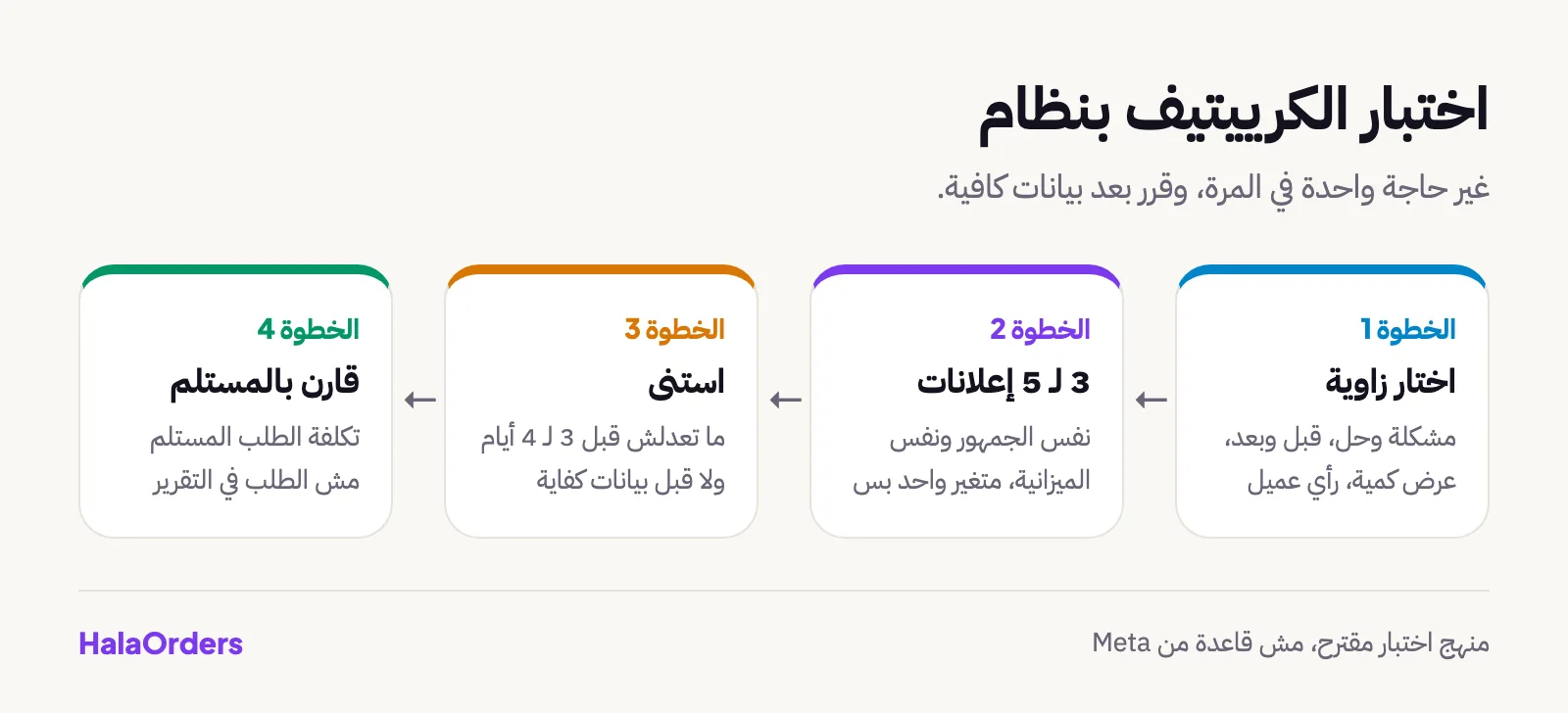
The creative (the image or video and its first 3 seconds) is the biggest variable in most campaigns. Test it with a simple system:
- Change one thing at a time: a different first video, a different offer or a different angle. If you change all three together, you won't know what made the difference.
- 3 to 5 ads per ad set, not 15.
- Wait for enough data before pausing an ad. An ad that spent 100 EGP without an order is not proof that it failed.
- Angles worth testing: problem and solution, before and after, a quantity offer ("2 for 1,100 instead of 1,300"), a real customer review, and an unedited video showing the product in hand.
If you are thinking of preparing photos or videos with AI, first look at AI product photography and check that the product appears in the image as it really is.
How to read the results: reported cost per order versus delivered
This is the part that matters with cash on delivery. Ads Manager counts a "purchase" as soon as the customer presses "Confirm order". But for us, a phone confirmation follows, the order may be cancelled, and it may be refused at the door.
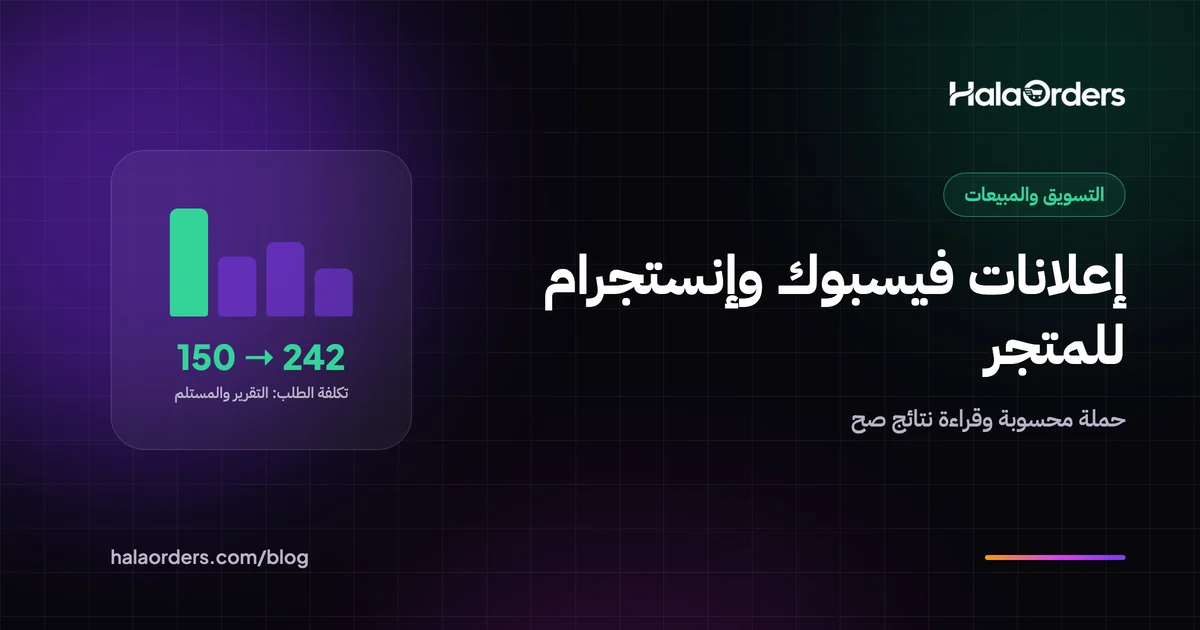
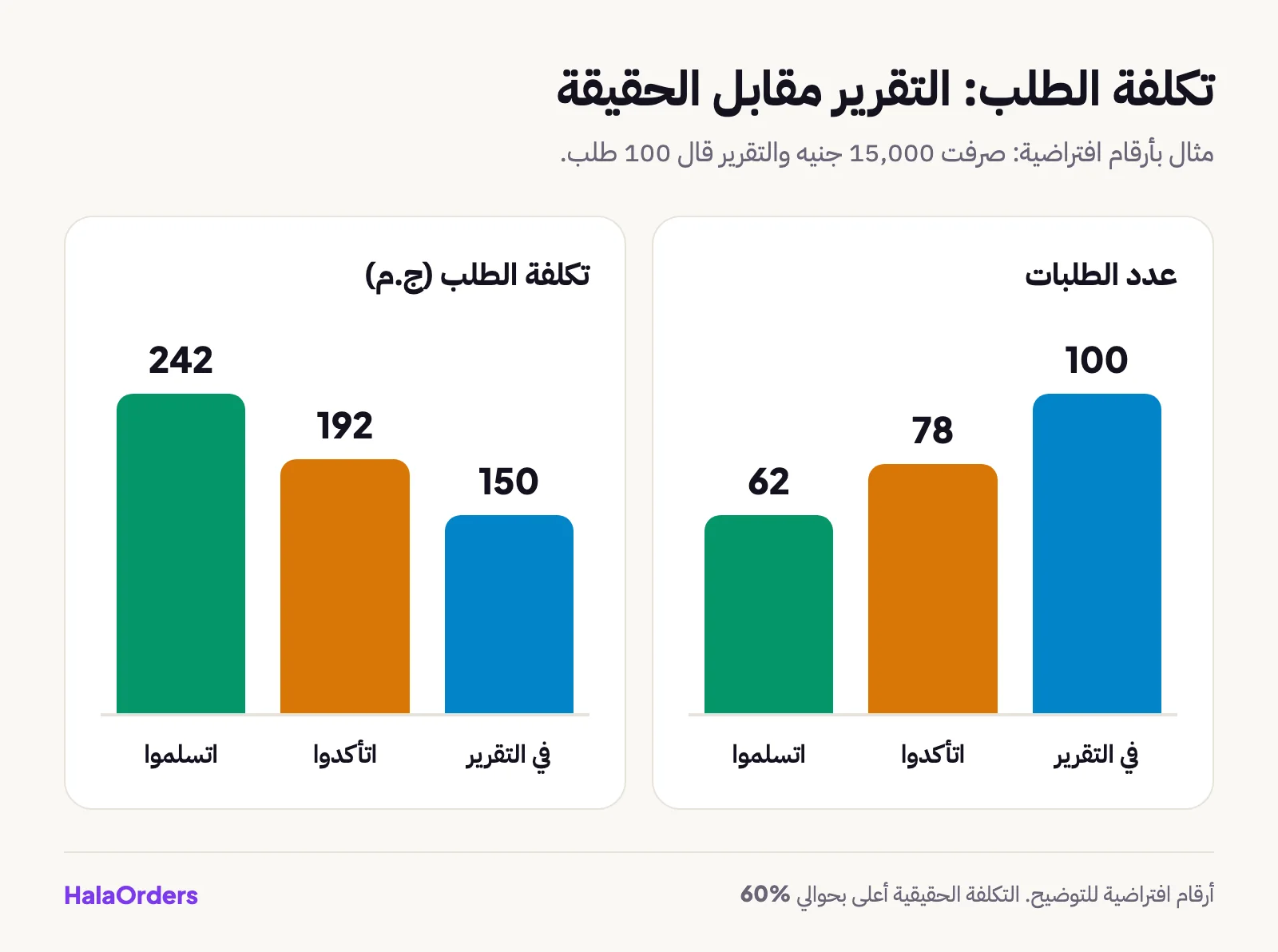
An example with hypothetical numbers: you spent 15,000 EGP and the report said 100 orders.
| Step | Count | Cost per order |
|---|---|---|
| Orders in the report | 100 | 150 EGP |
| Confirmed orders | 78 | 192 EGP |
| Delivered orders | 62 | 242 EGP |
So the real cost is about 60% higher than what is shown. If the margin before ads is 340 EGP per delivered piece, there is still a profit (62 × 340 = 21,080 EGP minus 15,000 of ads = about 6,080 EGP), but if you hadn't calculated it this way you would have judged the campaign wrongly. It also explains why the refusal rate is a topic of its own, which we covered in how to reduce fake orders.
Make it a weekly habit: compare the Ads Manager orders with your delivered orders for the same period, and calculate the ratio. Then compare campaigns by the cost per delivered order. And if you want to understand the other numbers (conversion rate, average order), see the conversion rate guide.
The ad alone isn't enough: the page after it
The best ad in the world is wasted if the page is slow or the shipping isn't clear. For the single product you are advertising, a landing page with the order form on the same page shortens the path. And site speed matters a lot because most visits come from mobile (store speed).
How does HalaOrders help here?
HalaOrders is an Egyptian platform for building online stores and landing pages. When it comes to ads:
- Meta Pixel, TikTok Pixel and Google Analytics 4 are added with just the ID from the dashboard, without touching code.
- Landing pages with ready templates, a visual editor, the order form on the page, quantity offers and a countdown, with A/B testing of up to 4 versions that picks the winner at 95% confidence automatically.
- Cash on delivery with an optional deposit (the shipping fee, a percentage or a fixed amount) reduces refused orders.
- Promo codes as a percentage or fixed amount, with a usage limit and start and end dates, that you can tie to a specific ad and measure.
- Telegram notifications for every new order and a daily report, so you can compare with the numbers in Ads Manager.
The plans are on the pricing page.
Steps to run your first campaign
- Make sure the store or landing page opens fast and that the pixel records the purchase event.
- Calculate your margin and target cost per order.
- Create a campaign with the Sales objective, and one ad set with a broad audience (Egypt, ages suited to the product).
- Upload 3 to 5 ads with different angles.
- Leave the campaign for 3 to 4 days without major edits.
- Compare with delivered orders after a week, and decide what to keep and what to stop.
The bottom line
Facebook and Instagram ads work when the campaign is simple, with a calculated budget, clean purchase data and results read on delivered orders. Start with one or two ad sets, test one angle at a time, and don't judge an ad before it has enough data.
Frequently asked questions
What budget should I start a Facebook ad with?
Work it out from your target cost per order: multiply it by 50 (the number of events Meta needs in 7 days for an ad set to exit learning). If the target is 150 EGP per order, that is 7,500 EGP a week. If you spend less, expect a fluctuating cost and don't edit every day.
What does Advantage+ mean in Facebook ads?
Advantage+ is a set of automation tools from Meta that let the algorithm choose the audience, placements and budget split. Advantage+ Sales campaigns are designed for online stores, and suit those with a working pixel and enough orders, with less control than a manual campaign.
What is the difference between the Meta Pixel and Conversions API?
The pixel sends visitor events from the browser, and Conversions API sends them from the server. Meta recommends using both together with deduplication through the same event name and event_id, because the browser can lose some events.
Why are there more orders in Ads Manager than are delivered?
Because Meta counts a purchase when the customer confirms the order in the store, and with cash on delivery some of those are cancelled at confirmation or refused at delivery. Compare weekly with delivered orders and calculate the cost per delivered order.
How long should I wait before deciding an ad has failed?
Until the ad set has collected enough data, about 50 events in 7 days according to Meta, or at least 3 to 4 days without major edits. Major edits restart the learning phase.
Sources
- DataReportal: Digital 2026 Egypt
- Meta Business Help Center: About the learning phase
- Meta Business Help Center: About learning limited
- Meta for Developers: Launching your first ad campaign
- Meta for Developers: Handling duplicate Pixel and Conversions API events
- Meta for Developers: Advantage+ shopping campaigns
- Meta: Advantage+ sales campaigns