If you own a small store, you are probably the social media manager too. You shoot in the morning, write the post on the commute, and answer "how much?" while standing at the shipping office. And when the week gets busy, the page goes silent for 4 days and customers think you have closed.
The fix isn't working more, it is batching the work into two hours once a week and letting tools publish the posts for you and handle the first reply to messages. In this article we explain AI social media management tools that suit an Egyptian store, which of them are free, what you shouldn't leave to automation, and how to build a simple content calendar that actually runs.
In short: social media management tools let you schedule posts once and have them published on their own, gather messages in one place, and some write drafts for you with AI. For a small store, start with Meta Business Suite (free for Facebook and Instagram) and Canva for design, and add Buffer or Metricool if you want more than one platform. AI writes the draft, and you review it and add your own voice.
What is AI social media management?
Social media management is planning, publishing, replying and following up on a brand's pages. AI comes into three things: writing drafts of captions and hashtags, suggesting content ideas, and automatic replies to common messages. All of this saves time, but it doesn't replace your knowledge of your customers.
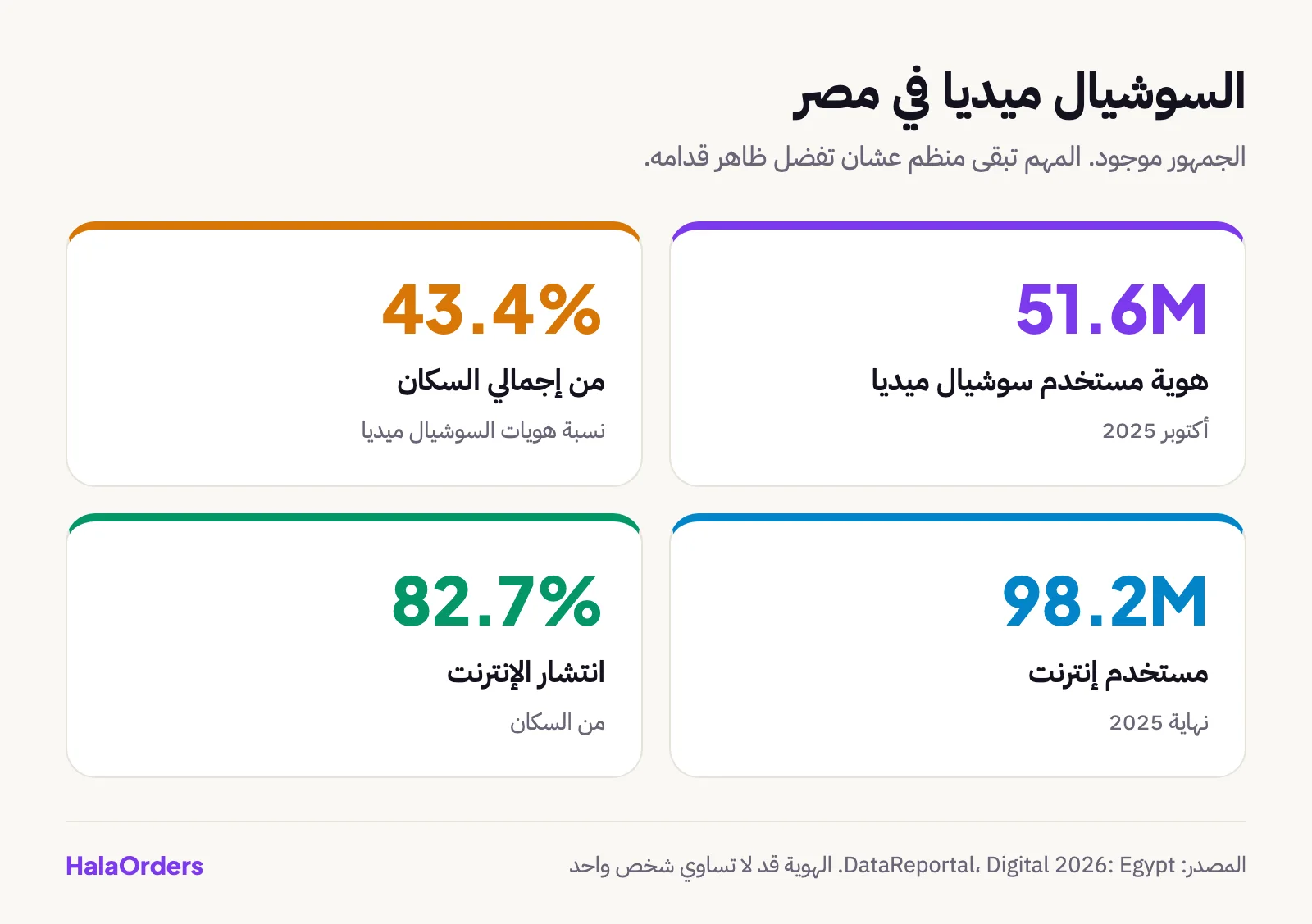
According to DataReportal's Digital 2026 report, Egypt had 51.6 million social media user identities in October 2025 (about 43.4% of the population). So the audience is there, competition for its attention is fierce, and almost every merchant publishes a post every day.
What are the best social media management tools for a store?
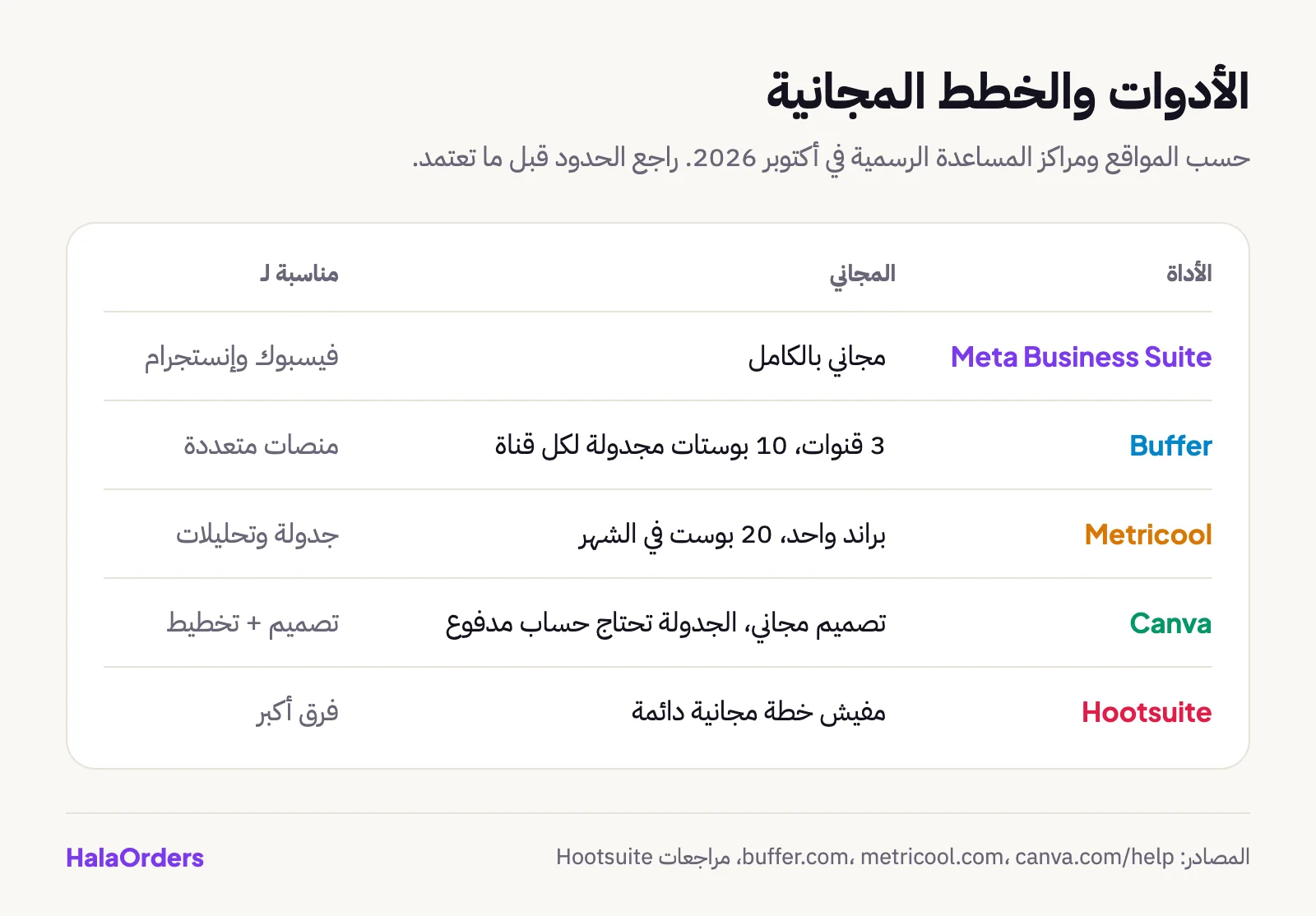
Prices and limits change, and the numbers below come from the official websites and help centers at the time of writing (October 2026). Check them before relying on them.
| Tool | What it does | Free plan | Notes |
|---|---|---|---|
| Meta Business Suite | Scheduling for Facebook and Instagram, a unified inbox for messages and comments, automatic replies | Free | Only for Meta's products, and doesn't cover TikTok |
| Buffer | Scheduling across multiple platforms, an AI assistant for writing captions | Up to 3 channels, and 10 scheduled posts per channel | Paid plans are priced per channel |
| Metricool | Scheduling, analytics and an AI assistant | One brand, 20 scheduled posts a month according to the pricing page | No LinkedIn or X on the free plan |
| Canva | Design + a content planner and scheduling | A free plan for design | According to the Canva Help Center, scheduling requires a Pro, Business or similar account, and the supported platforms change |
| Hootsuite | Scheduling, analytics and the OwlyWriter AI caption tool | No permanent free plan according to most reviews | Paid, and aimed at teams bigger than a small store |
Which one should I start with?
If you only sell on Facebook and Instagram: Meta Business Suite is enough, so don't pay. If you want to post on other platforms such as TikTok, try the free Buffer. And if you want better analytics, look at Metricool. Hootsuite is usually overkill for a store that is just starting.
How does AI work in these tools?
Buffer offers an assistant that writes or rephrases captions, Metricool has an AI assistant, and Hootsuite has OwlyWriter for writing captions and hashtags. The quality of their Arabic isn't guaranteed, so test it yourself before relying on it. It is better to write the draft in Egyptian Arabic yourself or with ChatGPT (see using ChatGPT in your store), and then put it into the scheduling tool.
How do I make a simple content calendar that actually runs?
A calendar isn't a complicated spreadsheet; it is simply 3 to 4 types of post that repeat. An example (a hypothetical split) for a clothing store publishing 4 posts a week:
| Day | Post type | Example |
|---|---|---|
| Saturday | Product | A photo of a 650 EGP dress with the sizes |
| Monday | Trust | A photo of order packing or a customer reply (with their permission) |
| Wednesday | Useful content | How to choose the right size |
| Thursday | Offer | A promo code valid for 48 hours |
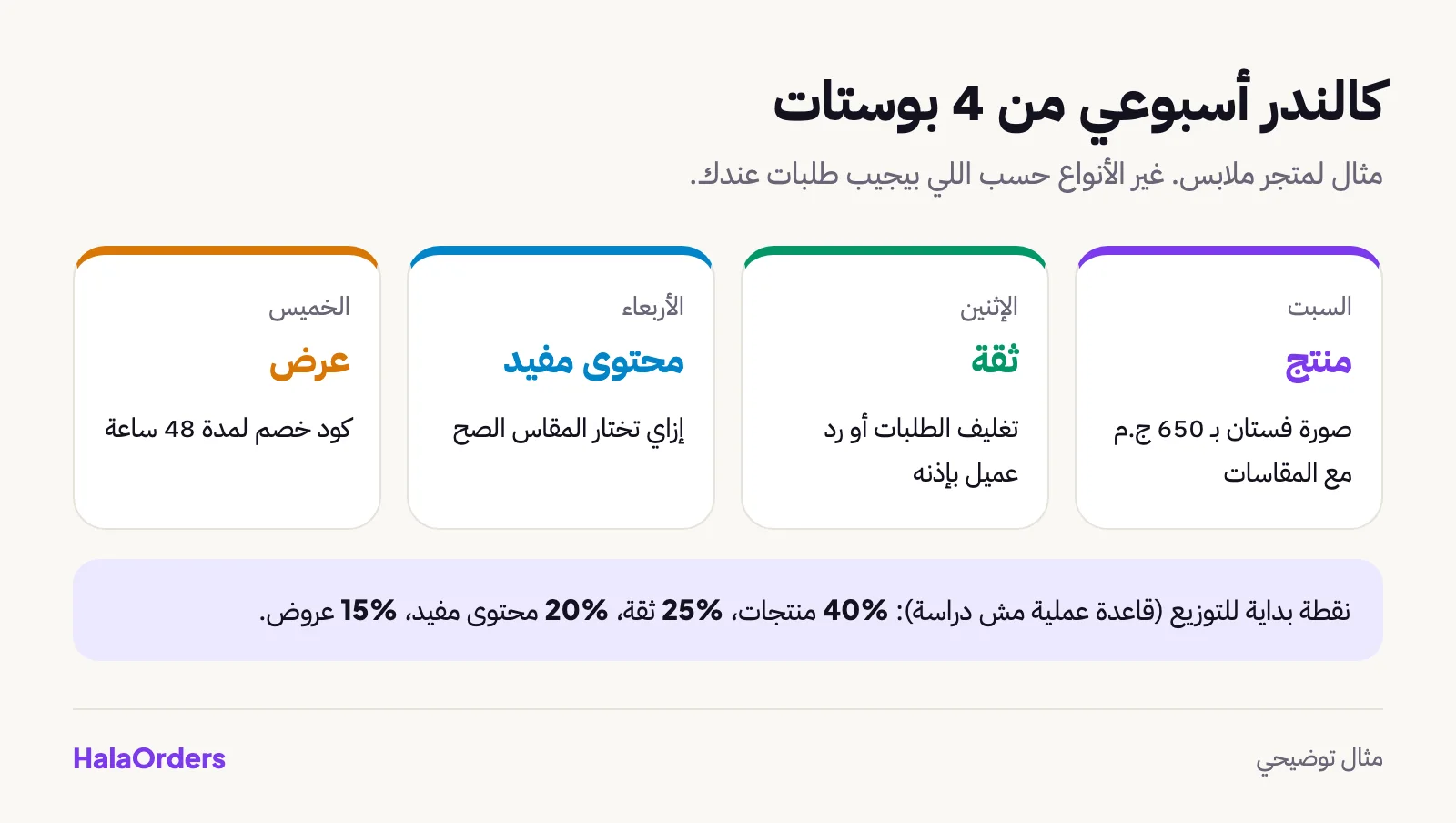
And if you want to control the mix: 40% products, 25% trust, 20% useful content, 15% offers is a reasonable starting point (a practical rule, not a number from a study). Adjust it according to what brings orders.
How do I ask AI for post ideas?
The more precise your request, the closer the draft is to your voice. Try a prompt like this and replace the brackets with your information:
I own a store selling [type of products] in Egypt, and my audience is [women aged 20-35].
Give me 10 Instagram post ideas for one week, in Egyptian Arabic.
For each idea: the type (product/trust/useful content/offer) + an attention-grabbing first line.
Don't use exaggerated promises, and don't make up prices.
After the tool replies, choose the ideas that fit your real products, and write the final caption yourself. And keep in mind that AI tools sometimes suggest offers or features you don't have.
When should I post?
There is no magic hour for everyone. Start with the times your audience is free (after work or university, or the night before payday, for example), then look at your page's analytics in Meta Business Suite and adjust. If you schedule in Buffer or Metricool, the tool shows analytics that help you see which times bring more engagement.
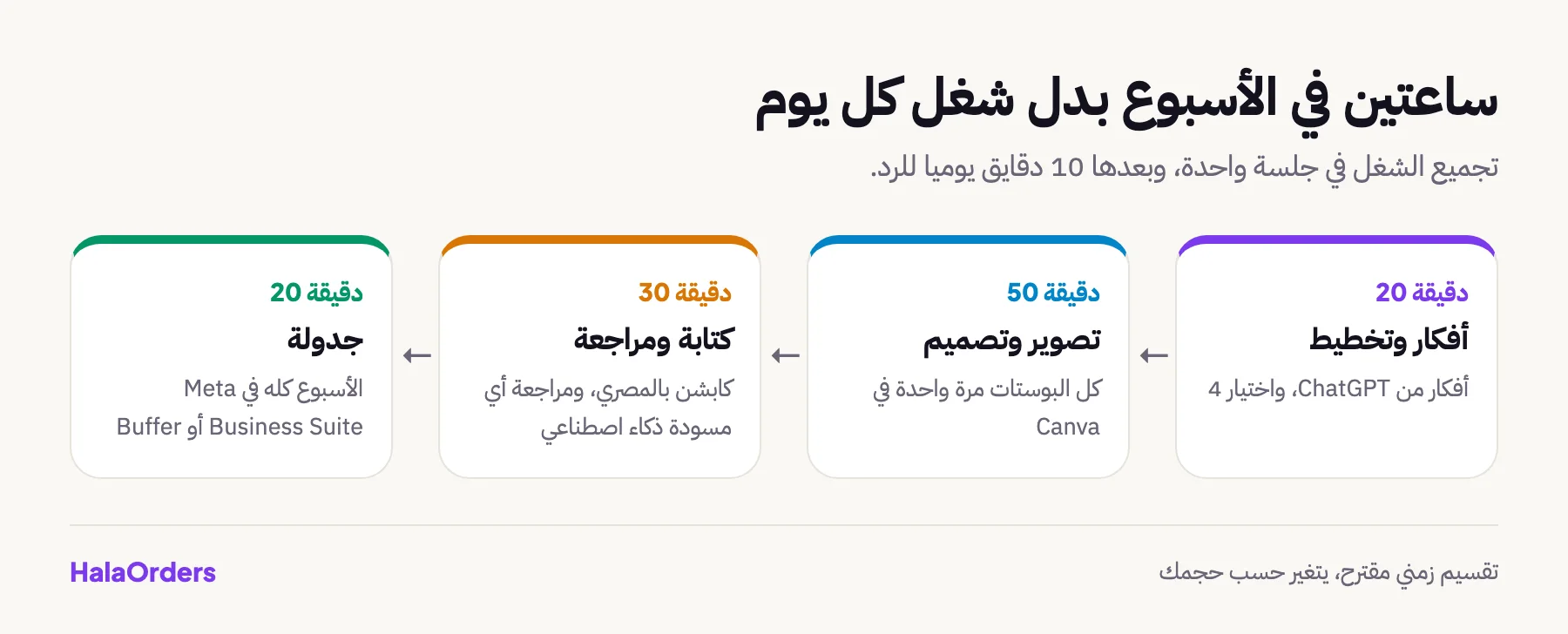
Steps to organize your social media work in two hours a week
- Choose a fixed day (Friday, for example) for planning.
- Ask ChatGPT for 10 ideas for a week based on your products, and choose 4.
- Shoot or design all the posts at once in Canva.
- Write the captions in Egyptian Arabic, and review any AI draft.
- Schedule the whole week in Meta Business Suite or Buffer.
- Set aside 10 minutes a day to reply to messages and comments.
- Review the numbers the following Friday: which post brought messages and orders?
How do I use automatic replies without losing the customer?
According to the Meta Help Center, the Inbox in Meta Business Suite supports automatic replies to messages, including keyword-based replies (up to 5 keywords per reply), currently available on the desktop version only. They are useful for questions like "price", "shipping" and "sizes", and for replying with "we'll get back to you within an hour" outside working hours.
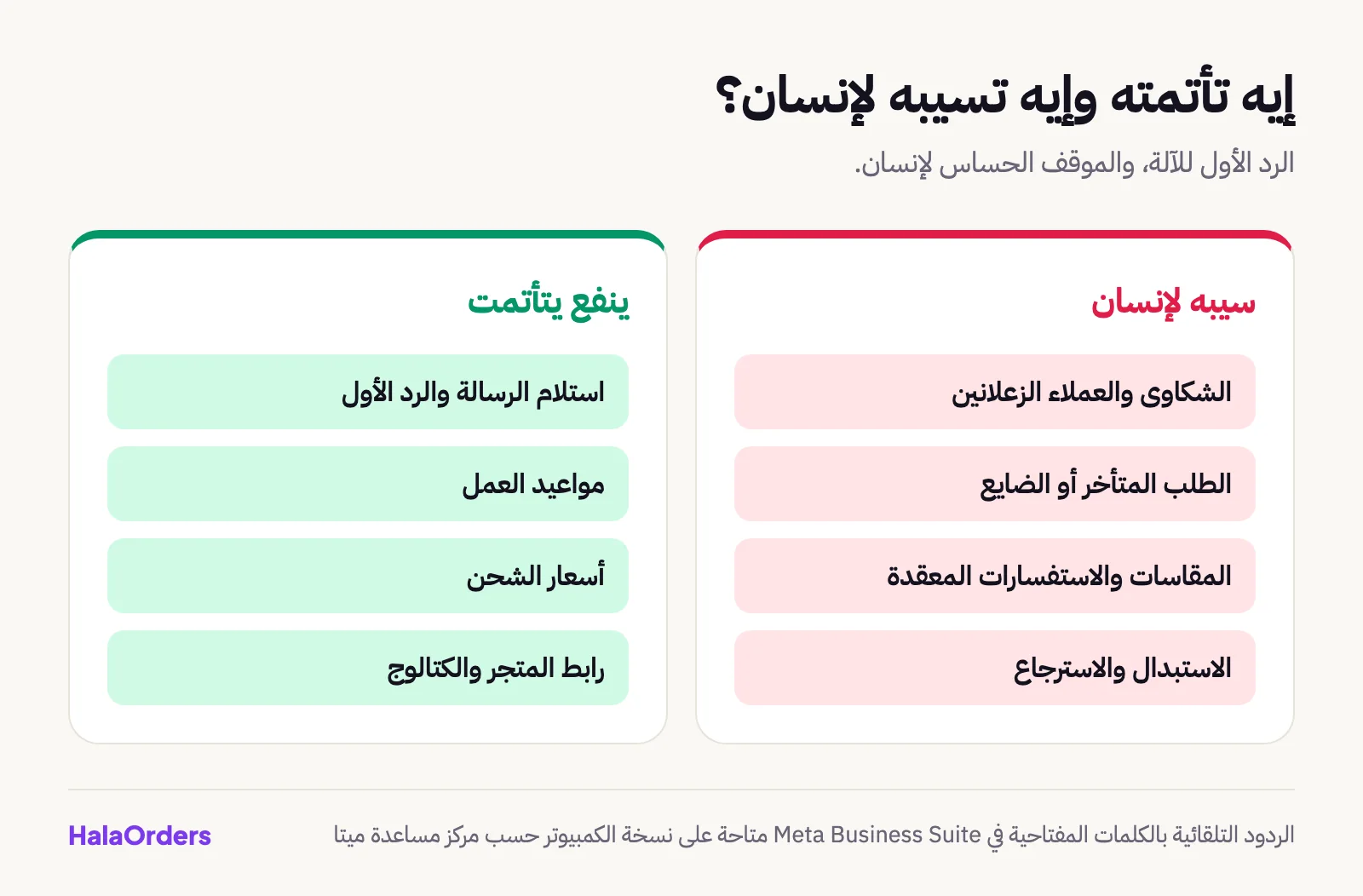
Automate: acknowledgement (we received your message), working hours, shipping prices, the store link. Don't leave to automation: complaints, details of a delayed order, complicated sizing, anyone who is upset. That needs a person; see AI customer service for detail.
What are the risks of relying on AI for social media?
- Generic copy that sounds like every page. What AI writes without editing usually lacks your voice. Edit it in your own Egyptian words.
- Wrong information. It may invent a material, a price or a feature. Check every number.
- The AI-made content label. If you post generated images, Meta may add an "AI info" label.
- Scheduling isn't a substitute for replying. A scheduled post with nobody answering the comments loses half its value.
- Customer privacy. Don't put real customers' names and numbers into AI tools.
How does HalaOrders help with social media?
HalaOrders is an Egyptian platform for building online stores and landing pages; it isn't a scheduling tool and doesn't provide message or WhatsApp automation. What it does is receive the order that came from social media:
- A landing page for each product that you put in your bio link or ad, with the order form inside it.
- A store with fast WebP images on mobile and ordering without an account; see from an Instagram page to a store.
- The Meta Pixel, TikTok Pixel and Google Analytics so you know which post brought orders.
- Telegram notifications for every new order and a daily report, plus a newsletter subscriber list.
- A store blog where you publish useful content instead of putting everything on social media.
See the plans.
The bottom line
Commit to two hours a week for planning, design and scheduling, and ten minutes a day for replies. Start with Meta Business Suite and Canva, and add Buffer or Metricool if you need them. AI is for the draft; replying to customers and the brand's voice are on you.
Frequently asked questions
What is the best free tool for scheduling Facebook and Instagram posts?
Meta Business Suite is the best fit because it is free, schedules for Facebook and Instagram and gathers messages and comments in one Inbox. If you need other platforms such as TikTok, Buffer has a free plan for up to 3 channels and 10 scheduled posts per channel.
Can AI write captions in Egyptian Arabic?
Yes as a draft, but the quality of Arabic in scheduling tools isn't guaranteed. It is better to write in Egyptian Arabic yourself or with ChatGPT, then review the text and change any odd wording before scheduling.
How many posts a week are enough for a small store?
3 to 4 posts a week of consistent quality beat a daily post that keeps slipping. For example: a product, trust, useful content and an offer. Consistency matters most, and check which type brings messages and orders.
Does Meta allow automatic replies to messages?
Yes. According to the Meta Help Center, the Inbox in Meta Business Suite supports keyword-based automatic replies, with a maximum of 5 keywords per reply, currently available on the desktop version. Use them for repeated questions and leave complaints to a person.
How do I know which post brought orders?
Install the Meta Pixel and Google Analytics on the store, use a different link in each post or ad, and review the source of your orders weekly. That way you know which type is worth repeating.